
Shuts down Mac after your iTunes playlist is finished. #Shutdown Mac #Restart Mac #Schedule shutdown #Shutdown #Schedule #ITunes
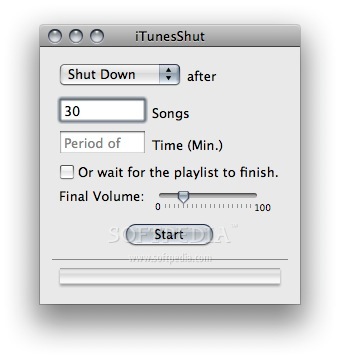
iTunesShut is the tool you need if you fall asleep with the music from iTunes and want to shut down your Mac after the music has finished automatically.
With this little app it is possible, without to schedule a time in the System Preferences. The application recieves a notification from iTunes, about the player state.
If iTunesShut is "stopped", then an AppleScript will be started and shuts down, restarts, quits iTunes or sleeps the Computer.
iTunesShut has an English and a German localization!
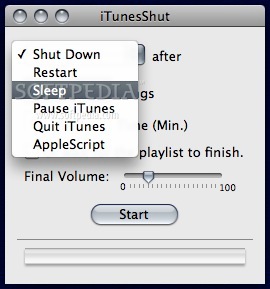
iTunesShut is a utility which allows you to Shut Down, Restart, Sleep, Pause or Quit iTunes after listening to a predetermined number of tracks, length of time, or entire playlist in iTunes. You can optionally have the volume fade out over this period, if desired.
Enter the number of songs you want to play, then choose an action to occur after those tracks finish-Shut Down, Restart, Sleep, Pause iTunes, or Quit iTunes-and then click Start. Alternatively, you can enter a number of minutes.
After the designated number of tracks finishes playing, iTunesShut performs the chosen action; iTunesShut updates the "To Play" box during playback to let you know how many tracks or minutes remain before the action occurs.
If you prefer to finish the current playlist, instead of choosing a number of songs, check the "Or wait for the playlist to finish" box.
iTunesShut doesn't affect iTunes' playback settings; whatever playback mode you've chosen in iTunes will be used. For example, if you want to play the same track 10 times and then pause iTunes, just set iTunes to "track repeat" and set iTunesShut to 10 songs and Pause iTunes.
Download Hubs
iTunesShut is part of these download collections: iTunes Tweaks, Energy Saving Tools
What's new in iTunesShut 4.9.10:
- iTunesShut now is aware when TimeMachine is running and does not Shut down, restart or sleep the Mac until TimeMachine has finished. Some bug-fixes.
iTunesShut 4.9.10
add to watchlist add to download basket send us an update REPORT- runs on:
- Mac OS X 10.4 or later (PPC & Intel)
- file size:
- 349 KB
- filename:
- iTunesShut.zip.zip
- main category:
- Utilities
- developer:
- visit homepage
ShareX

Windows Sandbox Launcher

IrfanView

Context Menu Manager

Microsoft Teams

calibre

4k Video Downloader

Bitdefender Antivirus Free

7-Zip

Zoom Client

- Bitdefender Antivirus Free
- 7-Zip
- Zoom Client
- ShareX
- Windows Sandbox Launcher
- IrfanView
- Context Menu Manager
- Microsoft Teams
- calibre
- 4k Video Downloader