Search Perform an advanced search query SOFTPEDIA
 
SOFTPEDIA
Updated one minute ago
HomeSubmit a program for being reviewedAdvertise on our websiteGet help on surfing our websitesSend us your feedbackGet information about our XML/RSS backend and how to use itBrowse the news archiveVisit our discussion forumVizitati forumul in limba romana


NormalFreeware onlyShareware only

NeoOffice 2.2.3 Patch 3

Click to download NeoOffice JIf you developed this product, click here to download your SoftPedia Pick Award
Add to download basket
Send update information
View more screenshots
Rating: Good (3.8/5)
Rated by: 30 user(s)
Recent news
- Creative Comes After Apple&...
- Apple Patent for Multiple D...
- Greenpeace Thinks It Made A...
- Apple and Full Sail Initiat...
- A Greener Apple
- Apple Revamps Apple Store S...
- iPhone Could Have A Bigger ...

 Downloads: 9,154
 Developer: NeoOffice.org | More programs by this producer
 License: GPL
 Price: FREE 
 OS: Mac OS X 10.3.9 or later
 Binary format: Universal Binary
 Size: 10.5 MB
 Download time: 56K: 25m 36s  64K: 22m 24s  128K: 11m 12s  768K: 1m 52s
 Last Updated: May 6th, 2008 15:41
 Category: MAC HD :: Word Processing
 Read reviews (0) Add a review Refer to friend Subscribe

NeoOffice J description Download
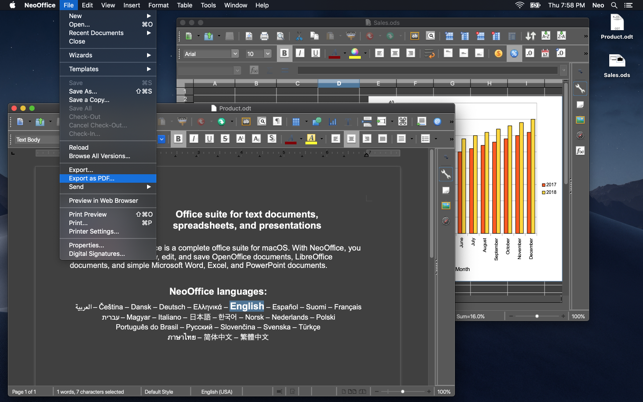
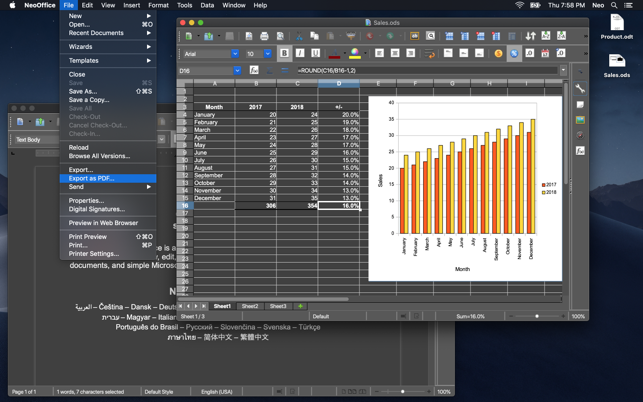
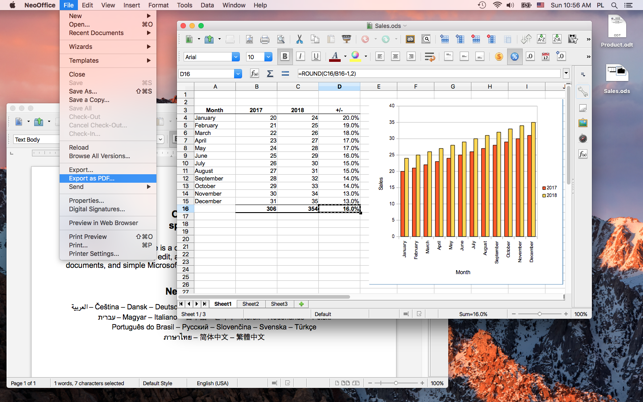
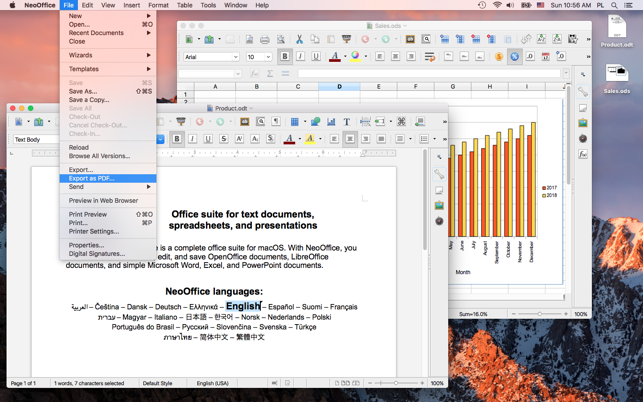
NeoOffice is a fully-featured set of office applications (including word processing, spreadsheet, presentation, and drawing programs) for Mac OS X.

Based on the OpenOffice.org office suite, NeoOffice incorporates dozens of native Mac features and can import, edit, and exchange files with other popular office programs such as Microsoft Office.

Unlike the Mac OS X release of OpenOffice.org, NeoOffice does not require the X11 windowing system.

Released as free, open-source software under the GNU General Public License (GPL), NeoOffice is fully functional and stable enough for everyday use. The software is actively developed, and updates and improvements are available on a regular basis.

Available Languages: Czech, Dutch, English, French, German, Italian, Japanese, Norwegian, Spanish and Vietnamese.

Here are some key features of "NeoOffice":

· Uses the Native Mac OS X Spellchecker
Unlike OpenOffice.org, NeoOffice has an enhanced spellchecker that uses the Mac OS X spellchecking dictionary. With this enhanced spellchecker, users no longer need to download and install spellchecking dictionaries if Mac OS X already has a dictionary for their language.

· Uses the Native Mac OS X Address Book
NeoOffice has included the ability to use the Mac OS X address book as a data source. This feature, which was developed by OpenOffice.org, is expected to be in their OpenOffice.org 2.3 release.

· Handles Most Microsoft Office 2007 Word, Excel, and PowerPoint Files
NeoOffice includes the ODF Add-in for Microsoft Word, Excel, and PowerPoint. The ODF Add-in is an open source project that makes it possible for NeoOffice to open, edit, and save most files in the Office 2007 Word, Excel, and PowerPoint formats. This feature is not available in current Mac versions of Microsoft Office and will not be available until Office 2008 for the Mac is released.

· Handles Macros in Excel Files
NeoOffice includes the Excel macro support developed by Novell's ooo-build project. The ooo-build project is an open source project that continually develops feature enhancements to OpenOffice.org.

· Aqua
Unlike OpenOffice.org, NeoOffice has native Aqua menus, file open and save dialogs, print dialogs, buttons, scrollbars, and many other native Aqua user interface elements.

· No X11 software required
NeoOffice uses the Java technology that is built into Mac OS X. By using Java, there is no need to download and install the X11 software that OpenOffice.org requires.

· Uses Mac OS X fonts
Unlike OpenOffice.org, NeoOffice uses the same fonts that all of your other Mac OS X applications use. This means that NeoOffice will handle reading and writing of Western European characters (e.g. characters with accents, umlauts, circumflexes, cedillas, etc.) and some fonts will even handle Japanese, Chinese, and Korean ideographs. Also, NeoOffice is able to use any fonts that you install using the /Applications/Font Book application.

· Handles international keyboards
Unlike OpenOffice.org, NeoOffice will use any keyboard layout that you use. Also, if you switch your keyboard layout while NeoOffice is running, NeoOffice will automatically switch as well.

· Native printing support
NeoOffice supports printing using Mac OS X's native printing functionality. Like other Mac OS X applications, you can use NeoOffice to print, preview, or save a document to a PDF file.

· Native copy and paste support
NeoOffice supports copying and pasting using Mac OS X's native clipboard so you can copy and paste text and images between NeoOffice and other Mac OS X applications.

· Native drag-and-drop support
NeoOffice supports native drag-and-drop so you can drag and drop text and images between NeoOffice and other Mac OS X applications.


Requirements:

· 512 MB of memory
· 400 MB of free disk space.


Note: 2.2.3 Patch 2 requires a full installation of NeoOffice 2.2.3 and will not install on any version of NeoOffice 2.2.2. Patch 2 includes all fixes and additions of previous patches.


What's New in This Release:

· New Media Browser functionality similar to the iLife Media Browser
· Implemented native floating palettes
· Support for magnify and swipe multitouch trackpad gestures
· Fixed a bug where the Autofilter did not display all choices in Calc
· Fixed a bug where the Autofilter caused problems when rows are deleted
· Fixed a bug where text import applied the wrong character set in Calc
· Fixed a bug where radio buttons were not properly drawn in Calc
· Fixed a bug where zooming a document with scrollwheel did not work
· Fixed a bug where Command-` window cycling included the 1x1 pixel window
· Fixed a bug where Command-` window cycling did not ignore palette windows
· Fixed a crash when one window had Bullets and Table toolbars open and another window did not
· Fixed a bug where text was miskerned when exporting to PDF
· Fixed a bug where text was miskerned when printing to high resolution printer
· Fixed a crash when loading a specific WordPerfect .wpd file ... [ read full changelog ]


Softpedia guarantees that NeoOffice 2.2.3 Patch 3 is 100% FREE, which means it is a freeware product (both for personal and commercial use) that does not contain any form of malware, including but not limited to: spyware, viruses, trojans and backdoors.

This software product was tested thoroughly and was found absolutely clean, therefore it can be installed with no concern by any computer user.However, it should be noted that this product will be retested periodically and the award may be withdrawn, so you should check back on this page from time to time.

NeoOffice J Download NeoOffice J Screenshots
Find Related Downloads Similar freeware programs


RECOMMENDED PROGRAMS IN THIS CATEGORY ( Word Processing )  

File Deamon 2.6
File Deamon - File management tool
1 MB | Mac OS X 10.1 or later | Shareware
screenshot
update
PDF2Office Professional 4.0
PDF2Office Professional is a comprehensive PDF document conversion and data extraction tool
22 MB | Mac OS X 10.3.9 or later | Trial
screenshot
pick | update
Grammatica Spelling and Grammar Checker 7.0.1
Grammatica is a powerful bilingual grammar and spell checker
6.66 MB | Mac OS X 10.3 or later | Trial
screenshot
update
BBEdit 8.7.2
BBEdit is a powerful text and HTML editor
15.44 MB | Mac OS X 10.4 or later | Trial
screenshot
pick | update
Arabic Genie 3.2
Arabic Genie - Arabic text converter & editor
4.5 MB | Mac OS 8.6 or later / OS X | Trial
screenshot
update
Apple Pages 3.0.2
Apple Pages - Word processor & page layout
27.8 MB | Mac OS X 10.3.9 or later | Comercialware
screenshot
update
Final Draft 7.1.3
Final Draft - Screenwriting software for film, TV and theater
17.5 MB | Mac OS X 10.3.9 or later | Trial
screenshot
update

MOST POPULAR PROGRAMS IN THIS CATEGORY ( Word Processing )  

Microsoft Word X 11.1
Microsoft invites you to test drive a free prerelease version of Microsoft Word X for Mac.
22.8 MB | Mac OS 10.2.8 or later. | Freeware
screenshot
pick | update
File Deamon 2.6
File Deamon - File management tool
1 MB | Mac OS X 10.1 or later | Shareware
screenshot
update
NFOViewer 0.3b
NFOViewer - Viewer for .nfo files
36 KB | Mac OS X | Freeware
screenshot
update
PDF2Office Professional 4.0
PDF2Office Professional is a comprehensive PDF document conversion and data extraction tool
22 MB | Mac OS X 10.3.9 or later | Trial
screenshot
pick | update
AbiWord 2.4.6
AbiWord is a free word processing program similar to Microsoft Word
9.0 MB | Mac OS X 10.2 or later | GPL
screenshot
pick | update
Grammatica Spelling and Grammar Checker 7.0.1
Grammatica is a powerful bilingual grammar and spell checker
6.66 MB | Mac OS X 10.3 or later | Trial
screenshot
update
BBEdit 8.7.2
BBEdit is a powerful text and HTML editor
15.44 MB | Mac OS X 10.4 or later | Trial
screenshot
pick | update

go to top  


Welcome!
Hello, Guest

Login if you have a Softpedia.com account.

Otherwise, register for one.

Main categories:
  • Dashboard Widgets
  • Automator Actions & Workflows
  • Spotlight Plugins & Utilities
  • Antivirus
  • Audio
  • Business
  • Communications
  • Compression Tools
  • Developer Tools
  • Development
  • Drivers
  • DTP/Prepress
  • Educational
  • Finance
  • Font Tools
  • Games
  • Graphics
  • HTML Tools
  • Internet Utilities
  • iPod Tools
  • Math/Scientific
  • Multimedia
  • Network/Admin
  • Screensavers
  • Security
  • System Utilities
  • Utilities
  • Video
  • Desktop
  • Word Processing
  • Week's best:
  • Parallels Desktop 3....
  • Deep Freeze 4.03.071...
  • OpenOffice.org 3.0 B...
  • Easy Translator 2.9....
  • ReelBean 3.6 Build 1...
  • SoundConverter 20080...
  • Sound Studio 3.5.6
  • OpenOffice.org 3.0 B...
  • Microsoft Messenger ...
  • DayLite 3.7.3
  • OnyX 1.9.5
  • Adium 1.2.5
  • Opera 9.50 Beta 2 Bu...
  • CheckUp 1.1.1
  • MediaEdit 3.0.4
  • phpMyAdmin 2.11.6.0
  • LimeWire X 4.17.9 Be...
  • VueScan 8.4.71
  • Cyberduck 3.0 Beta 3...
  • GraphicConverter 6.1
  • © 2001 - 2008 Softpedia. All rights reserved.
    Softpedia™ and Softpedia™ logo are registered trademarks of SoftNews NET SRL.
    Copyright Information | Privacy Policy | Terms of Use | Contact Softpedia | Update your software | Archive