
A handy and intuitive tool that was created to help you change the appearance of your Mac OS X 10.5 dock from 3D to 2D and back again.. #Dock Changer #Dock theme #Dock appearance #Dock #Change #Theme
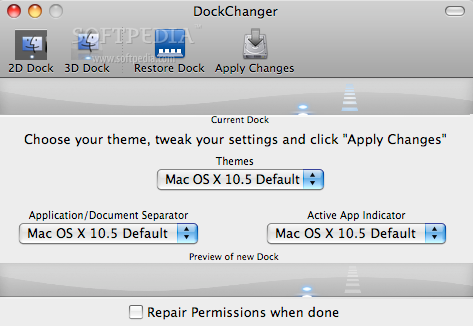
DockChanger is an useful tool for any user that wants to choose between 2D and 3D docks but it also enables you to change the dock theme, in order to customize the way your operating system looks.
The application comes with more than 90 different themes at backgrounds which you can use to enhance the looks of your operating system.
On top of that, DockChanger also allows you to match and mix the application indicator image and the separator image the way you want.
In order to use the application you just need to select a theme from the Theme menu, customize the dock separator and the active application indicator, them you have to click apply changes.
In order to add themes you must open the DockChanger themes folder and then drag and drop the theme you want to use.
If anything goes wrong, DockChanger even allows you to restore your dock to its original state, just by clicking the Restore Dock button.
Limitations in the unregistered version
- 10 changes trial.
DockChanger 1.8.3
add to watchlist add to download basket send us an update REPORT- runs on:
- Mac OS X 10.5 or later (PPC & Intel)
- file size:
- 47.3 MB
- filename:
- dockchanger183free.zip
- main category:
- Desktop
- developer:
Zoom Client

IrfanView

calibre

ShareX

4k Video Downloader

Bitdefender Antivirus Free

Context Menu Manager

Microsoft Teams

Windows Sandbox Launcher

7-Zip

- Microsoft Teams
- Windows Sandbox Launcher
- 7-Zip
- Zoom Client
- IrfanView
- calibre
- ShareX
- 4k Video Downloader
- Bitdefender Antivirus Free
- Context Menu Manager