
A simple, yet powerful Mac OS X software solution that is capable of quickly converting your movie files to printable flip books. #Convert movie #Video to flip book #Create flip book #Convert #Movie #Video
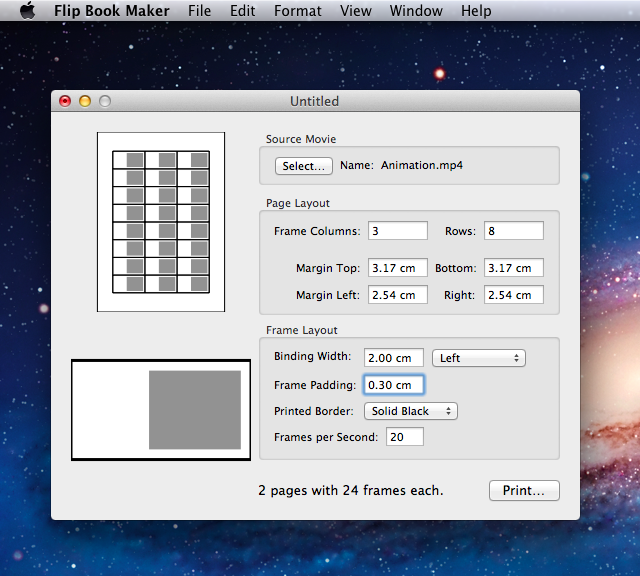
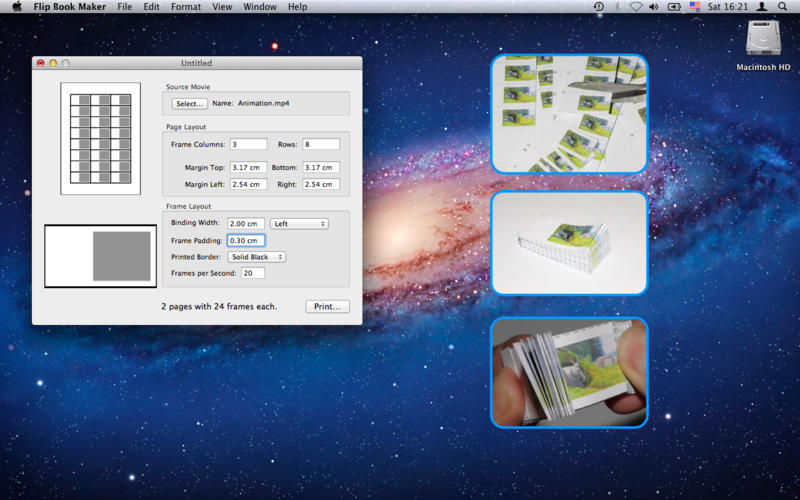
FlipBook is an intuitive and minimal OS X utility that enables you to quickly create and print flip books from your video files with minimal effort. It offers options to customize the page and frame layouts, as well as an area to preview the resulting snapshots.
Creating a flip book is a simple and quite straightforward procedure. First of all, you need to load a QuickTime movie (such as MOV, MP4 and more) that the application uses to generates screenshots based on how many frames per second you specify.
Afterwards, users are allowed to configure the page layout. Among the page layout options, we can name setting the number of frame columns and rows, as well as the sizes for the margin top, margin left, bottom and right. The best number of frames and rows in a page are probably 3 and 8, respectively.
The frame layout settings allow you to configure the area that you hold in your fingers while flipping the book, the area allocated to each image and the borders. You can also set the frames per second (20, for instance). What’s more, FlipBook displays how many pages and frames will be generated; the longer the movie, the more frames are generated.
In a way, one could say that FlipBook is a print tool that specializes in creating the right layout for flip books. However, one of the main functions is also the ability to generate frames based on a predefined value. When all options are set, users can click on the Print button to create the pages.
To sum up, the application does the hardest part in creating flip books. You just need to cut the frames from the printed paper and bind them using a specialized tool. FlipBook simplifies the process of printing flip books by offering a simple solution to capturing snapshots of a clip and placing them conveniently in a printable layout.
What's new in Flip Book Maker 2.1:
- Backwards compatible with Mac OS X 10.6
Flip Book Maker 2.1
add to watchlist add to download basket send us an update REPORT- runs on:
- Mac OS X 10.6.8 or later (Intel only)
- file size:
- 409 KB
- main category:
- Video
- developer:
- visit homepage
calibre

Windows Sandbox Launcher

4k Video Downloader

IrfanView

Zoom Client

Bitdefender Antivirus Free

Microsoft Teams

ShareX

paint.net

7-Zip

- ShareX
- paint.net
- 7-Zip
- calibre
- Windows Sandbox Launcher
- 4k Video Downloader
- IrfanView
- Zoom Client
- Bitdefender Antivirus Free
- Microsoft Teams