
A professional-strength file synchronization and backup utility for Mac OS X #Backup utility #File synchronization #Disk backup #Backup #Sync #Synchronizer
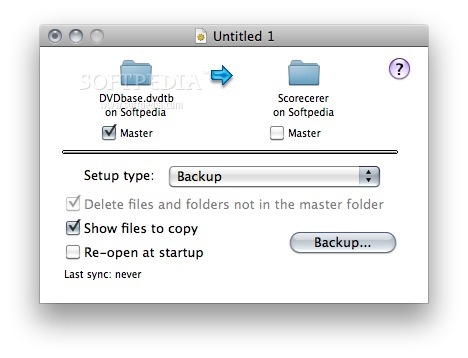
Synchronize! Pro X is an enhanced version of Synchronize! X Plus. In addition to the many features in Synchronize! X Plus, Qdea’s personal file synchronization software, it supports a number of advanced functions, including resolving aliases and more flexible ways to include or exclude files and folders.
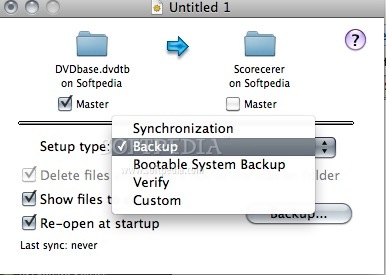
A “Synchronization” compares two files and copies the newer file to replace the older file, while a “Backup” always copies files in one direction. In general, it’s best to use a “Backup” if you want to make the destination look like the source, because there’s less room for error and a “Backup” takes less computer resources.
Synchronize! Pro X will always copy only the files that have changed – there is no difference in this respect between a “Backup” and a “Synchronization”. Because of this, updating a synchronization or a backup is as simple as running it again.
Synchronize! Pro X works with Mac OS X to copy files over the Internet. Synchronize! Pro X can compare and copy files on any disk which appears on the OS X desktop. Mac OS X can connect to AppleShare, File Sharing, NFS and SMB (Windows) servers.
Limitations in the unregistered version
- 7 days trial
Download Hubs
Synchronize! Pro X is part of these download collections: Create Backup, Folder Sync, Make Backup
What's new in Synchronize! Pro X 6.8.4:
- Fixed a bug which caused a crash when an item in the "Files To Copy" window is clicked.
Synchronize! Pro X 6.8.4
add to watchlist add to download basket send us an update REPORT- runs on:
- Mac OS X 10.4 or later (PPC & Intel)
- file size:
- 3.6 MB
- filename:
- SyncProX_684_Install.dmg
- main category:
- Utilities
- developer:
- visit homepage
IrfanView

Microsoft Teams

7-Zip

Context Menu Manager

Bitdefender Antivirus Free

Windows Sandbox Launcher

Zoom Client

ShareX

calibre

4k Video Downloader

- ShareX
- calibre
- 4k Video Downloader
- IrfanView
- Microsoft Teams
- 7-Zip
- Context Menu Manager
- Bitdefender Antivirus Free
- Windows Sandbox Launcher
- Zoom Client