
An application that was developed in order to make it easy for its users to change the startup mode and configuration from their desktop. #Select bit mode #Boot mode #Mode selector #Startup #Bit #Mode
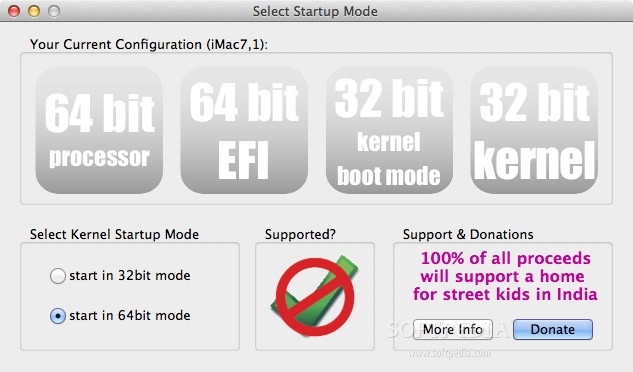
32- or 64-bit Kernel Startup is a straightforward Mac OS X application that provides certain information about your Mac's processor, EFI and kernel.
More specifically, you will be able to view whether you have a 32-bit or 64-bit processor and a 32-bit or 64-bit EFI. The EFI (Extensible Firmware Interface) is the piece of software that runs when you turn on your Mac and starts up your system.
The 32- or 64-bit Kernel Startup application displays whether your Mac's kernel is set to boot in 32-bit or 64-bit mode or if it running in 32-bit or 64-bit mode.
You will also be able to check if you can boot a 64-bit kernel on your Mac and whether Apple supports this operation. Moreover, you can select the start mode for your system's kernel: in 32-bit or 64-bit mode.
32- or 64-bit Kernel Startup is a great solution to view 32-bit and 64-bit information about your Mac's processor, kernel and EFI. It was designed for users who don't usually like to resort to the Terminal to obtain this information.
32- or 64-bit Kernel Startup 1.6.0
add to watchlist add to download basket send us an update REPORT- runs on:
- Mac OS X 10.4 or later (Intel only)
- file size:
- 2.3 MB
- filename:
- 32- or 64-bit Kernel Startup Mode Selector.zip
- main category:
- Utilities
- developer:
- visit homepage
Windows Sandbox Launcher

paint.net

IrfanView

4k Video Downloader

7-Zip

Microsoft Teams

ShareX

calibre

Bitdefender Antivirus Free

Zoom Client

- calibre
- Bitdefender Antivirus Free
- Zoom Client
- Windows Sandbox Launcher
- paint.net
- IrfanView
- 4k Video Downloader
- 7-Zip
- Microsoft Teams
- ShareX