
A lightweight and practical utility that makes it easy for you to simultaneously install multiple kext files and repair kext permissions for you system's folders. #Install kext #Repair kext permissions #Kext installer #Kext #Repair #Permission
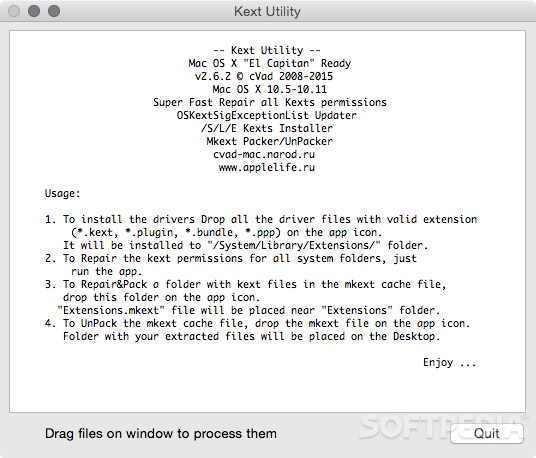
Kext Utility is a handy and very easy-to-use Mac application with support for OS X Mavericks, Yosemite, El Capitan and macOS Sierra that helps you install numerous kext files at the same time with little to no effort from your part.
When the functionality provided by any given loadable kernel model is no longer needed, it can be easily unloaded in order to free up memory and other resources.
Kext Utility is a straightforward app that enables you to easily install loadable kernel modules, known as kernel extension (kext), a fact that makes it an essential utility for Hackintosh installations.
The advantage provided by a loadable kernel module is that the operating system does not have to include all possible anticipated functionality already precompiled into the base kernel.
Otherwise, most of the existing functionality would require memory that is not used and force the user to rebuild and reboot the base kernel every time a new functionality is added.
Kext Utility can also be used to repair permissions for all system folders and rebuilt system caches. The repair process starts as soon as you launch the utility. Once completed, you just have to drag and drop the kext files you want to install. onto Kext Utility’s main window.
Thanks to Kext Utility you can also update records of the unsigned installed kexts in the AppleKextExcludeList.kext file, pack kext files to mkext cache files and vice versa.
In conclusion, Kext Utility is a quite practical and intuitive OS X utility for any user interested in hackintosh installations and kext cache file reparation.
What's new in Kext Utility 2.6.6:
- macOS Sierra support
Kext Utility 2.6.6
 Softpedia Editor's Pick
add to watchlist
add to download basket
send us an update
REPORT
Softpedia Editor's Pick
add to watchlist
add to download basket
send us an update
REPORT
- runs on:
- Mac OS X 10.6 or later (Intel only)
- file size:
- 288 KB
- filename:
- Kext_Utility.app.v2.6.6.zip
- main category:
- System Utilities
- developer:
- visit homepage
7-Zip

calibre

Windows Sandbox Launcher

Bitdefender Antivirus Free

4k Video Downloader

IrfanView

Microsoft Teams

Zoom Client

paint.net

ShareX

- Zoom Client
- paint.net
- ShareX
- 7-Zip
- calibre
- Windows Sandbox Launcher
- Bitdefender Antivirus Free
- 4k Video Downloader
- IrfanView
- Microsoft Teams