
A low-key and very useful application that enables you to manually or automatically stop the Flash plug-in in order to save your MacBook's battery. #Stop plug-in #Stop Flash #Save energy #Stop #Flash #Plug-in

All Mac users like to watch YouTube videos and play games on various websites and social networking site. At the same time, all of us are annoyed when Flash advertisements and Flash-related junk stress our processors, drain the battery and transforms our MacBook into a hot plate. Here is where FlashFrozen steps in to save the day.
FlashFrozen is a lightweight and unobtrusive application that offers you the power to stop the Flash plug-in and reduce the CPU load, decrease power usage, cool down your Mac and maximize the battery life.
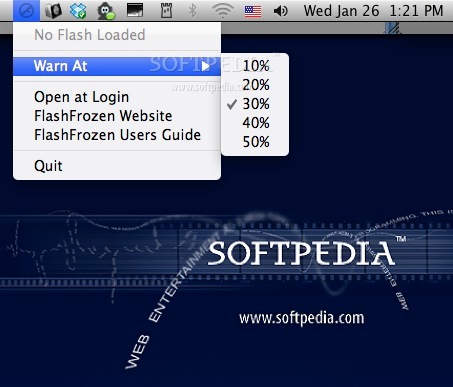
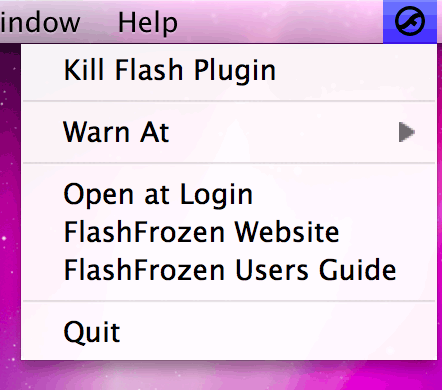
FlashFrozen lives in your Mac’s status bar from where you can easily access its menu and manually kill the Flash plug-in.
If you need to automatically stop all Flash content, you can enable the AutoKill mode and let FlashFrozen do the hard work by constantly killing all running Flash processes.
Firefox, Google Chrome, Opera and Safari (64-bit) are designed to single out the Flash plug-in onto its own process and, as a result, FlashFrozen is capable to monitor this process in order to warn you when Flash loads up your CPU.
When the Flash CPU usage level reaches 30%, FlashFrozen changes its status bar icon color from black to red in order to notify you about the CPU load. If the Flash plug-in is idle or not running at all, FlashFrozen’s menu bar icon turns grey.
You can access FlashFrozen’s “Warn At” menu and set the threshold at 10, 20, 30, 40 or 50%. When Flash uses a significant chunk of your Mac’s resource you can open FlashFrozen’s status bar menu and stop the Flash plug-in. All running Flash content is replaced with the broken plug-in message and your CPU usage will go back to normal.
What's new in FlashFrozen 1.3.6:
- FlashFrozen is ready for El Capitan! (or is it the other way around?)
- El Capitan's Safari handles AutoKill great again, so AutoKill has been re-enabled for Safari on OS X 10.11 and higher.
FlashFrozen 1.3.6
add to watchlist add to download basket send us an update REPORT- runs on:
- Mac OS X 10.6.6 or later (Intel only)
- file size:
- 900 KB

- main category:
- System Utilities
- developer:
- visit homepage
4k Video Downloader

Microsoft Teams

IrfanView

Windows Sandbox Launcher

Context Menu Manager

7-Zip

ShareX

calibre

Zoom Client

Bitdefender Antivirus Free

- calibre
- Zoom Client
- Bitdefender Antivirus Free
- 4k Video Downloader
- Microsoft Teams
- IrfanView
- Windows Sandbox Launcher
- Context Menu Manager
- 7-Zip
- ShareX