
A professional stop motion animation solution for your Mac #Stop motion animation #Create animation #Animation grabber #Stop motion #Grab #Animation
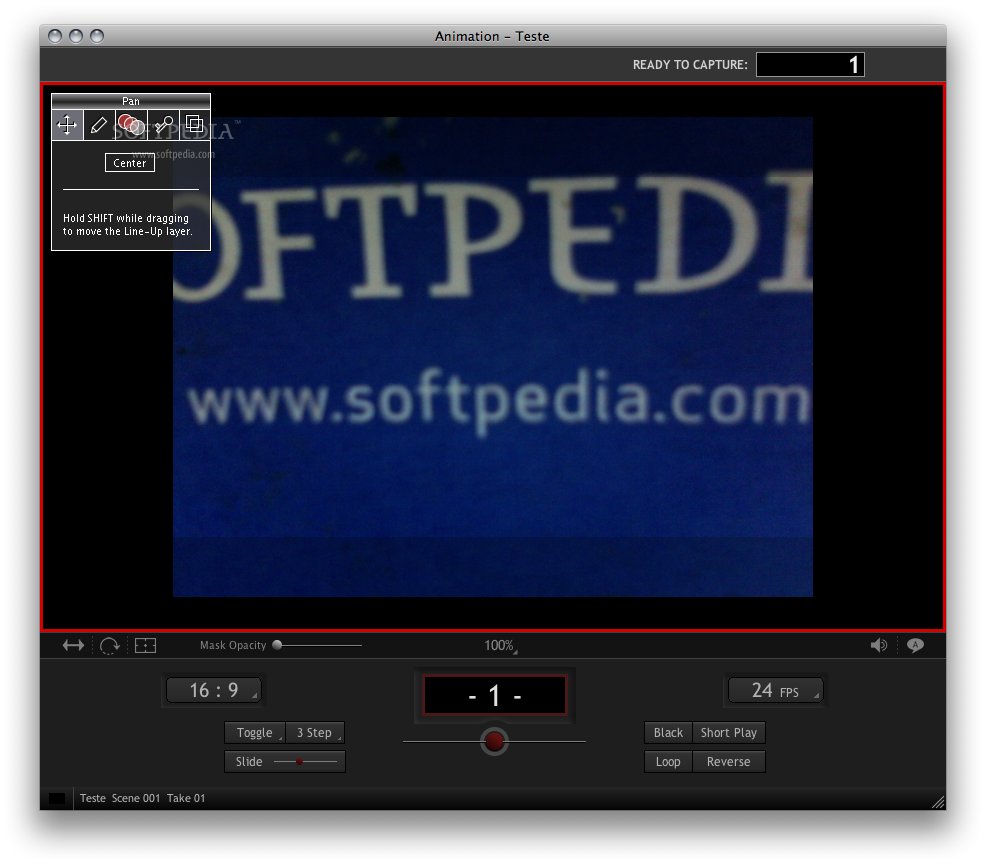
Dragon's U.I. was built for the art of stop-motion animation. In the middle of a shoot, you're focused on pulling off a fantastic performance, not hunting around with the mouse.
So Dragon's essential features are at your fingertips-on the keypad. It was designed under the stress of real production, and world-class feature animators have used Dragon and helped shape it.
Dragon Stop Motion concentrates on capturing high-resolution digital stills. The idea is simple: you can always work down from high-resolution stills to whatever formats you need. It works with high-end digital cameras that incorporate a "Live View" mode.
Dragon Stop Motion will allow you to grab from a separate video source if your digital still camera does not provide a live view. Also, if you prefer to work with video, Dragon Stop Motion will work for you as well.
NOTE: To be able to use this trial version you will ned to register on the developer's website for a temporary trial license. You can do that by clicking HERE.
System requirements
- QuickTime 7.2 or later.
- Any Intel based Macintosh.
- PPC G4 at 1.33 GHz.
- 1 GB RAM.
- Any QuickTime compatible video camera (unless your DSLR provides video).
- A supported digital still camera.
Limitations in the unregistered version
- 10 days trial period.
What's new in Dragon Stop Motion 2.3.7:
- Updated for Mac OS X Lion (10.7).
- Fixed Canon Powershot connectivity with Leopard and Snow Leopard running in 32-bit mode.
- Fixed Nikon D3X live view connectivity.
- Cinematography window properly updates camera settings display when switching takes.
Dragon Stop Motion 2.3.7
add to watchlist add to download basket send us an update REPORT- runs on:
- Mac OS X 10.4.8 or later (PPC & Intel)
- file size:
- 25 MB
- filename:
- DragonStopMotion_2.3.7.zip

- main category:
- Multimedia
- developer:
- visit homepage
Windows Sandbox Launcher

calibre

ShareX

4k Video Downloader

Context Menu Manager

Microsoft Teams

7-Zip

Zoom Client

Bitdefender Antivirus Free

IrfanView

- Zoom Client
- Bitdefender Antivirus Free
- IrfanView
- Windows Sandbox Launcher
- calibre
- ShareX
- 4k Video Downloader
- Context Menu Manager
- Microsoft Teams
- 7-Zip