
An easy to use media converter for Macs. #Video converter #QuickTime converter #Video encoder #Convertor #Converter #QuickTime
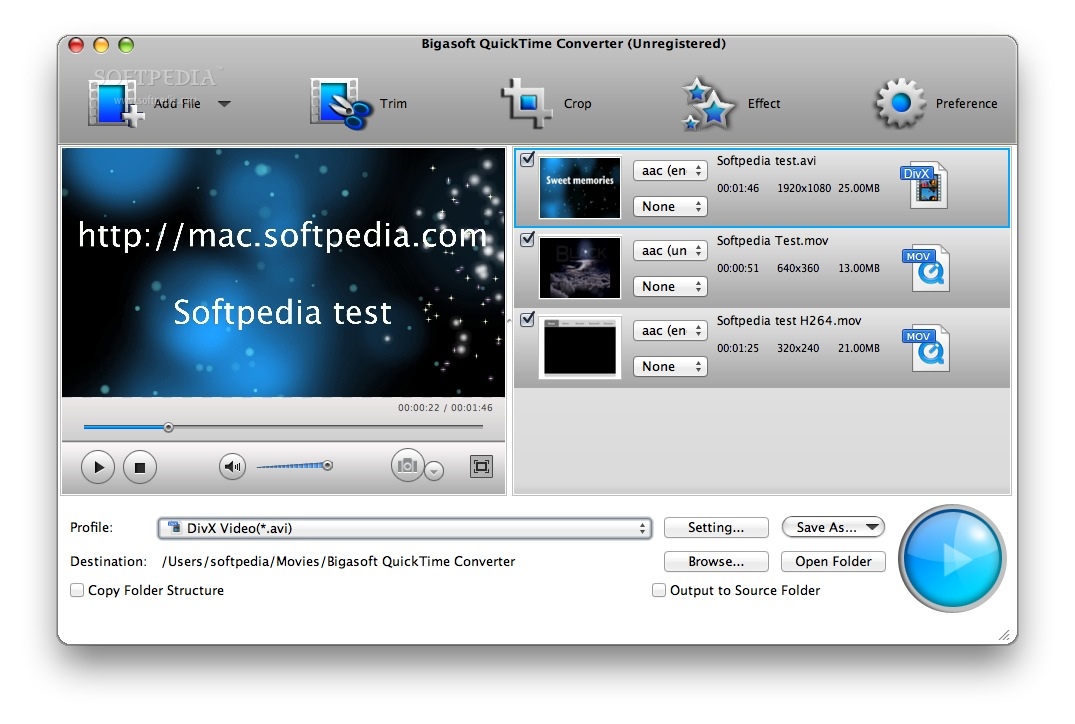
Bigasoft QuickTime Converter for Mac supports converting various video including convert AVI to QuickTime, WMV to QuickTime, and convert RMVB, MOD, TOD, FLV, MKV, DIVX, VP8 and more to QuickTime MOV for playing on QuickTime.
QuickTime Converter Mac also supports converting QuickTime movies to video formats such as convert QuickTime to MP4, QuickTime to AVI, QuickTime to WMV and convert QuickTime to FLV, 3GP, DivX, Xvid, MPEG-1, MPEG-2, ASF for all portable devices and players such as iPod, iPhone, Apple TV, PSP, Xbox 360, Wii, Smart Phones, BlackBerry, Archos, Creative Zen, iRiver, Pocket PC, PDA, etc.
Various options to fit your unique needs are provided by Bigasoft QuickTime Converter Mac, such as video crop, movie trimming, aspect ratio selection, the resolution adjustment and more.
System requirements
- 512MB RAM
- 50MB free hard drive space
- Super VGA (800 x 600) resolution
- 16-bit graphics card or higher
Limitations in the unregistered version
- Limited to 5 minutes conversion of a more than 5 minutes file and with a less than 5 minutes file, only converts half of it in the demo version.
- Start-up nag screen.
Bigasoft QuickTime Converter 5.0.7.5736
add to watchlist add to download basket send us an update REPORT- runs on:
- Mac OS X 10.4 or later (PPC & Intel)
- file size:
- 45.2 MB
- filename:
- b-quicktime-converter-mac.dmg
![Bigasoft QuickTime Converter [DISCOUNT: 20% OFF!] - The Advanced Settings window helps you change the video and audio properties and values.](https://mac-cdn.softpedia.com/screenshots/Bigasoft-QuickTime-Converter_2.jpg "Bigasoft QuickTime Converter [DISCOUNT: 20% OFF!] - The Advanced Settings window helps you change the video and audio properties and values.")
![Bigasoft QuickTime Converter [DISCOUNT: 20% OFF!] - By accessing the Video Edit window, you can trim, crop, add watermarks and effects to the selected video file.](https://mac-cdn.softpedia.com/screenshots/Bigasoft-QuickTime-Converter_3.jpg "Bigasoft QuickTime Converter [DISCOUNT: 20% OFF!] - By accessing the Video Edit window, you can trim, crop, add watermarks and effects to the selected video file.")
![Bigasoft QuickTime Converter [DISCOUNT: 20% OFF!] - screenshot #4](https://mac-cdn.softpedia.com/screenshots/Bigasoft-QuickTime-Converter_4.jpg "Bigasoft QuickTime Converter [DISCOUNT: 20% OFF!] - screenshot #4")
![Bigasoft QuickTime Converter [DISCOUNT: 20% OFF!] - screenshot #5](https://mac-cdn.softpedia.com/screenshots/Bigasoft-QuickTime-Converter_5.jpg "Bigasoft QuickTime Converter [DISCOUNT: 20% OFF!] - screenshot #5")
- main category:
- Multimedia
- developer:
- visit homepage
7-Zip

calibre

Microsoft Teams

Context Menu Manager

ShareX

IrfanView

Windows Sandbox Launcher

Zoom Client

Bitdefender Antivirus Free

4k Video Downloader

- Zoom Client
- Bitdefender Antivirus Free
- 4k Video Downloader
- 7-Zip
- calibre
- Microsoft Teams
- Context Menu Manager
- ShareX
- IrfanView
- Windows Sandbox Launcher