
Helps you connect to your home network via your Mac. #Configure VPN #Create VPN #VPN configuration #VPN #L2TP #Configuration
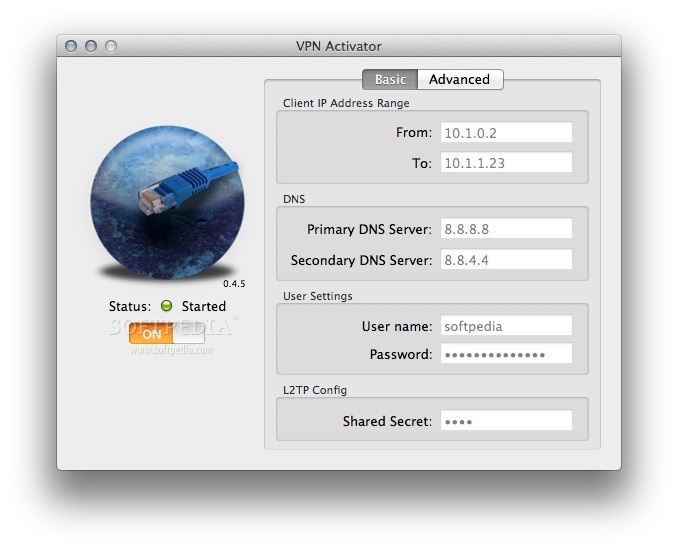
VPN Activator is a free and easy to use, simple GUI that will start an L2TP VPN server on your Mac.
All files necessary to do this are already on your Mac, so no Apple files are distributed through VPN Activator. Given that you properly configure you internet router to allow L2TP across to your Mac you should be able to connect to your home network via your Mac running VPN Activator.
How To Use: · Configure the desired IP address range that you want to assign to your VPN clients. · Configure the desired DNS servers. · Configure the desired User name and Password · Configure the desired VPN Shared Secret. Pick something hard to guess. · Click on the ON switch to save the config and start the VPN server. If all goes well the server should start. For now my status check routine if really dumb and does not actually check if the server is running, so don’t rely too much on it yet. Once the server is started the configuration fields go inactive until the server is stopped and changes can be made. · Configure your Airport Extreme to forward ports UDP500, 1701 & 4500 to your Mac. Open Airport Utility, Click Advanced and select Port Mapping · Click the “+” sign and fill in the blanks. Make sure to put the IP address of your Mac (and not mine) in the Private IP Address field. · Configure your iPad or iPhone to use your Mac as a VPN. · Configure the VPN and activate. You should now be connected to your home network.
What's new in VPN Activator 0.4.7:
- Fix for crash upon opening config file modified via OSX Server
- Compile under 10.8.3
VPN Activator 0.4.7
add to watchlist add to download basket send us an update REPORT- runs on:
- Mac OS X 10.6.8 or later (Intel only)
- file size:
- 358 KB
- filename:
- VPNActivator v0.4.7.zip
- main category:
- Internet Utilities
- developer:
- visit homepage
paint.net

Windows Sandbox Launcher

Zoom Client

calibre

7-Zip

IrfanView

Bitdefender Antivirus Free

4k Video Downloader

ShareX

Microsoft Teams

- 4k Video Downloader
- ShareX
- Microsoft Teams
- paint.net
- Windows Sandbox Launcher
- Zoom Client
- calibre
- 7-Zip
- IrfanView
- Bitdefender Antivirus Free