
An easy-to-use macOS application that offers you the possibility to create and edit websites without requiring programming skills. #HTML editor #WYSIWYG editor #Website designer #Website #Designer #HTML
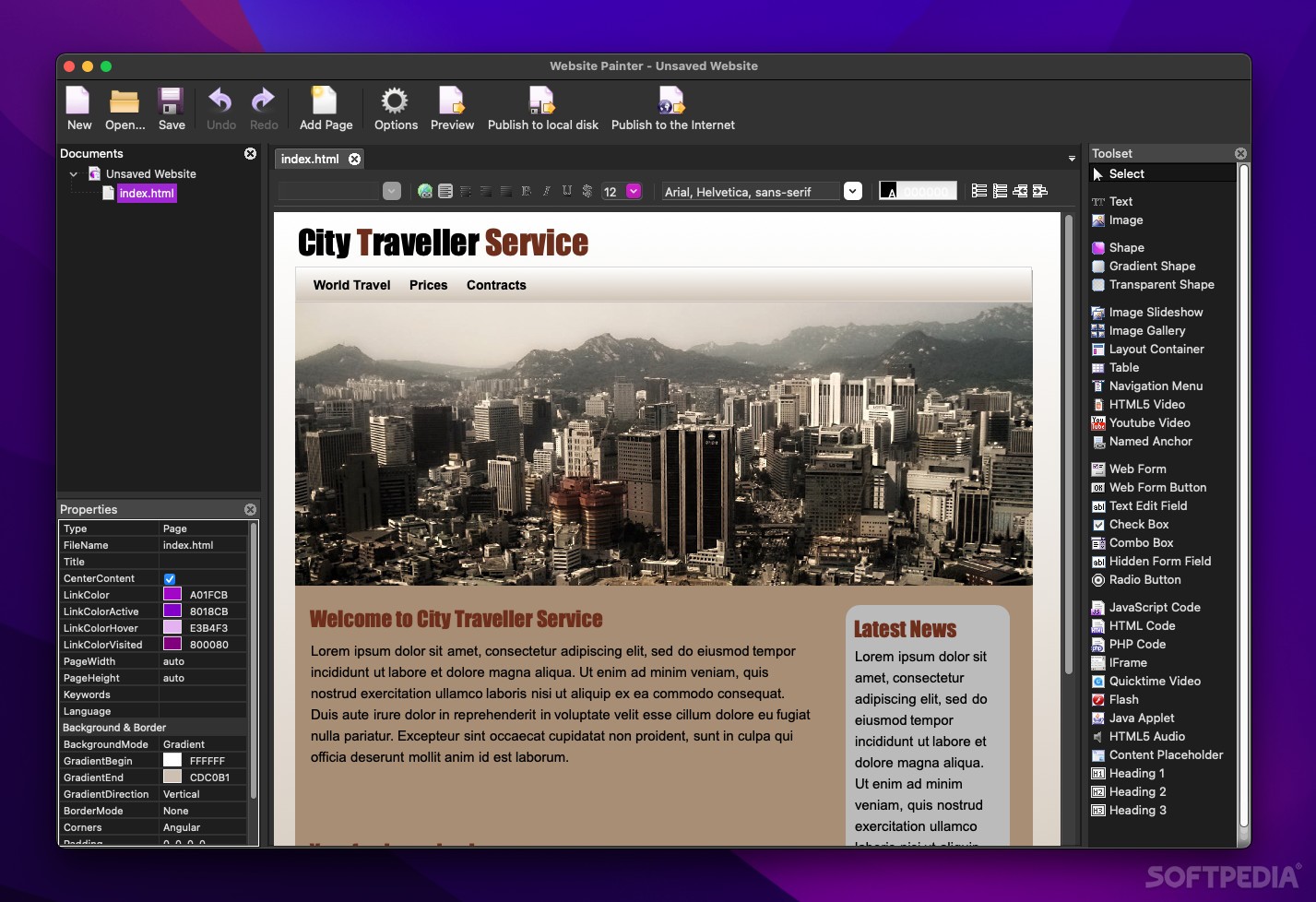
WebsitePainter enables you to create and edit unsophisticated websites via an intuitive WYSIWYG interface, without making you deal with the HTML source code. As a result, the app can be successfully employed even by inexperienced users.
WebsitePainter also includes a collection of templates that can be quickly edited to match your own needs. This way, the processing time is greatly reduced, while the final result has a clean, organized, and professional look.
WebsitePainter offers you the possibility to view the HTML code generated for your project, but all the editing is performed via the app’s main window which is a simple and organized WYSIWYG editor.
The main area is reserved for previewing / editing the website, while various panels display the documents included in your project, the available tools, the properties for the currently selected object, and much more.
Right of the bat, the top area of the website editing window provides basic text processing tools (you can change the alignment, the font size and style, and more) and allows you to create hyperlinks.
However, most of the available editing tools are accessible via the WebsitePainter Toolset panel: you can create text boxes, insert images, Web 2.0 shapes, gradient / transparent shapes, named anchors, image slideshows / galleries, layout containers, tables, navigation menus, Flash elements, Java applets, web forms or web form buttons, iFrames, JavaScript / PHP / HTML code, or video and audio content.
WebsitePainter provides a simple solution for designing websites even if you do not have programming skills. The editing process is fairly intuitive and you can access to a wide range of powerful tools via simple mouse clicks or through drag and drop actions.
WebsitePainter can help you publish your project directly to the internet, as long as you can provide the FTP address for your server and your account credentials.
Download Hubs
WebsitePainter is part of these download collections: HTML Managers, PHP Editor
WebsitePainter 3.7.1
add to watchlist add to download basket send us an update REPORT- runs on:
- macOS 10.9 or later (Intel only)
- file size:
- 11.5 MB
- filename:
- WebsitePainter-3.7.1.dmg
- main category:
- HTML Tools
- developer:
- visit homepage
Bitdefender Antivirus Free

4k Video Downloader

7-Zip

calibre

Windows Sandbox Launcher

IrfanView

Context Menu Manager

Zoom Client

ShareX

Microsoft Teams

- Zoom Client
- ShareX
- Microsoft Teams
- Bitdefender Antivirus Free
- 4k Video Downloader
- 7-Zip
- calibre
- Windows Sandbox Launcher
- IrfanView
- Context Menu Manager