
A simple, drag and drop based Mac OS X application designed to instantly generate all the thumbnails you need for your projects.. #Picture thumbnail #Thumbnail generator #Create thumbnail #Thumbnail #Thumb #Icon
Generating image thumbnails for web projects, or other types of assignments can prove to be time consuming, especially when dealing with a large image collection, and various output sizes.
ThumbsUp is a minimalist Mac OS X application that automatically generates thumbnails when you drag and drop the files on top of its Dock icon. The best part is that ThumbsUp comes with batch processing capabilities, so you will be able to process all your images at the same time.
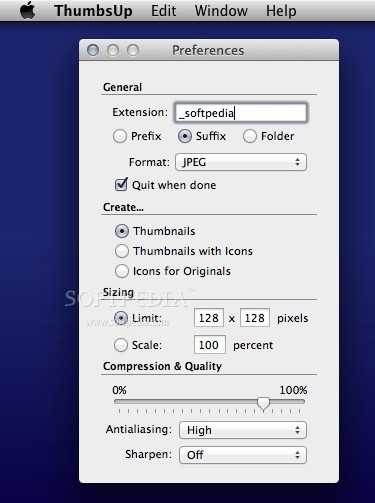
Right of the bat, in the ThumbsUp main window you must start by making the necessary adjustments for the output images: once the settings are in place, the editing is reduced to drag and drop actions.
To be able to distinguish between the output files, ThumbsUp enables you to add prefixes or suffixes: the new files will be sent to the source directory, but their name will have a different pattern. However, you can also choose to quickly create a new folder for the new image files.
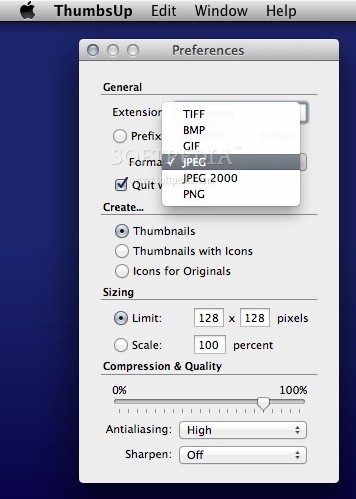
ThumbsUp enables you to employ different file formats for the thumbnails: TIFF, BMP, GIF, JPEG, JPEG 2000, or PNG. At the same time, you can choose to create only thumbnails, thumbnails with icons, or icons for originals.
Other customization options include the possibility to limit the thumbnail size, to adjust the image scale, to change the compression and quality level, or to modify the antialising and sharpening methods.
ThumbsUp is a great tool to have around if you need to generate image thumbnails that have different sizes for a large collection of files: as soon as you make all the necessary adjustments, the processing is ultimately reduced to a simple drag and drop action.
Download Hubs
ThumbsUp is part of these download collections: Make Thumbnail, Create Thumbnail
ThumbsUp 4.5.3
add to watchlist add to download basket send us an update REPORT- runs on:
- Mac OS X 10.6.8 or later (Intel only)
- file size:
- 465 KB
- filename:
- ThumbsUp.app.zip
- main category:
- Graphics
- developer:
- visit homepage
IrfanView

4k Video Downloader

Bitdefender Antivirus Free

Windows Sandbox Launcher

7-Zip

Microsoft Teams

Zoom Client

calibre

Context Menu Manager

ShareX

- calibre
- Context Menu Manager
- ShareX
- IrfanView
- 4k Video Downloader
- Bitdefender Antivirus Free
- Windows Sandbox Launcher
- 7-Zip
- Microsoft Teams
- Zoom Client