
Blender plugin that allows you to create f-curves. #F-curve creator #Blender f-curve #Blender plugin #F-curve #Blender #Plugin
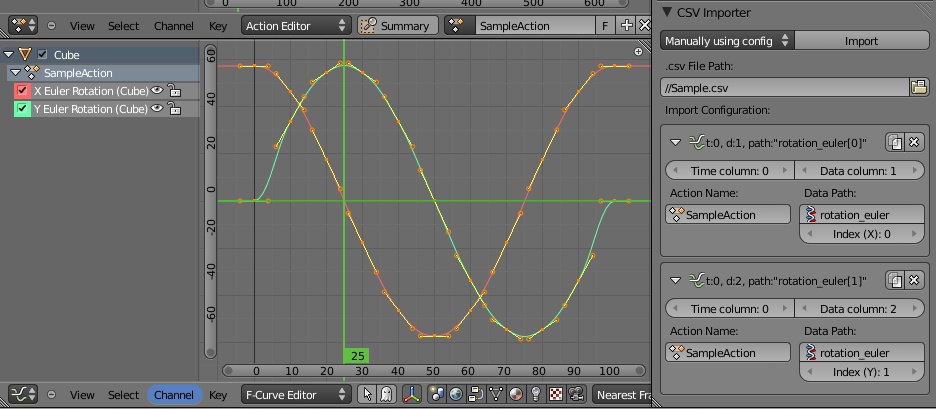
CSV F-Curve Importer is an open source Python plugin for Blender that allows you to import a CSV file and create f-curves.
CSV F-Curve Importer can import and generate multi f-curves in any Data Paths in any Action data at once.
· Download and unzip the plugin · Close Blender if it's running. · Copy the Python script to "%BlenderInstalledAddress%\Blender\%Version%\scripts\addons\". (where %BlenderInstalledAddress% is Blender's installation folder, and %Version% the installed version) · Start Blender. · From the top menu, select "File -> User Preferences..." to see Blender User · Preferences window. · In the left list, select "Import-Export" item · Click the check box of the script and make sure a check mark is placed. · Click "Save As Default" button to keep this setting.
System requirements
What's new in CSV F-Curve Importer 0.7 Alpa 1:
- Updated for Blender 2.57
CSV F-Curve Importer 0.7 Alpa 1
add to watchlist add to download basket send us an update REPORT- runs on:
- Mac OS X (-)
- file size:
- 189 KB
- filename:
- csv_fcurve_importer v0_7_alpha1.zip
- main category:
- Graphics
- developer:
- visit homepage
Bitdefender Antivirus Free

paint.net

4k Video Downloader

ShareX

Windows Sandbox Launcher

Microsoft Teams

Zoom Client

calibre

IrfanView

7-Zip

- calibre
- IrfanView
- 7-Zip
- Bitdefender Antivirus Free
- paint.net
- 4k Video Downloader
- ShareX
- Windows Sandbox Launcher
- Microsoft Teams
- Zoom Client