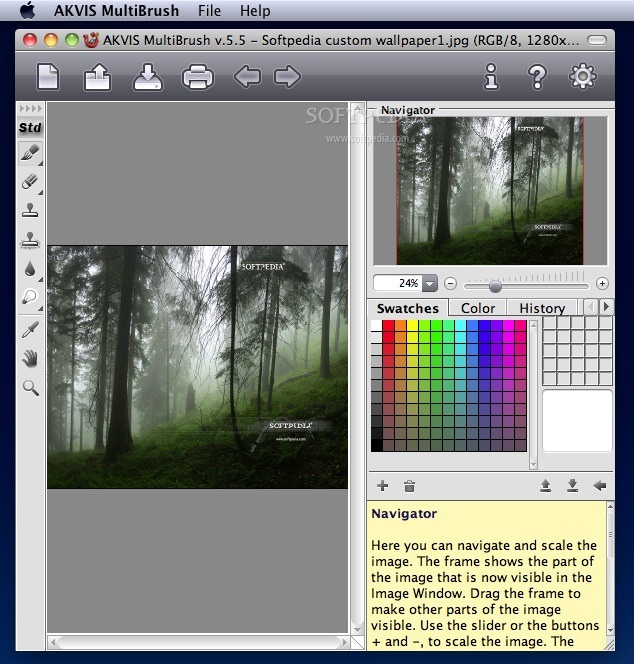
AKVIS MultiBrush (formely known as AKVIS Stamp) is a photo retouching tool for seamless defects removal and objects cloning.
AKVIS MultiBrush makes it easy to retouch photos and enhance portraits in Windows and Mac. Featuring a collection of healing and enhancement brushes, cloning and stamping tools,
AKVIS MultiBrush helps artists, photographers and home users to perform portrait enhancement, retouch image flows and remove unwanted objects from digital pictures.
Available as a stand-alone product or a plug-in for Adobe Photoshop, AKVIS MultiBrush removes scars, wrinkles, scratches, and enhances imperfect skin on portraits in the most natural way. Spots, stains, and dust are easy to mask and remove.
Here are some key features of "AKVIS MultiBrush":
· Portrait Enhancement Made Easy - AKVIS MultiBrush makes it easy to retouch photos and enhance portraits in Windows and Mac. Featuring a collection of healing and enhancement brushes, cloning and stamping tools, AKVIS MultiBrush helps artists, photographers and home users to perform portrait enhancement, retouch image flows and remove unwanted objects from digital pictures. Available as a stand-alone product or a plug-in for Adobe Photoshop, AKVIS MultiBrush removes wrinkles, scars, scratches, and enhances imperfect skin on portraits in the most natural way. Spots, stains, and dust are easy to mask and remove.
· Healing and Retouching Images - Chameleon Brush heals skin problems and removes dust, spots and scratches without affecting background texture, lighting or colors. This unique brush is similar to Adobe Healing Brush, yet offers more flexibility and customization options.
· Impressive Collages with Artistic Cloning - The Artistic Cloning mode makes AKVIS MultiBrush truly unique. This innovative mode makes it possible to clone parts of a picture in a really smart way. Sample, adjust and re-source parts you’re about to multiply through the image, and create impressive collages with little effort.
· Original Image Preservation - There are many more tools in AKVIS MultiBrush to retouch and enhance portraits, restore scratched pictures, and create artistic collages and compositions. All pens and brushes found in AKVIS MultiBrush feature automatic adjustments to preserve the original’s color and tonal range, texture and brightness, lighting and shadows. As a result, the part of the image that was restored or the cloned object blends into the original background seamlessly and looks very natural.
Requirements:
· Intel/G4
· 1 Gb RAM
· 100 Mb HDD
· screen resolution 1024x768
Limitations:
· 10 days trial.
· The Create file, Color and Swatches features are available only for Deluxe and Business licenses.
What's New in This Release: [ read full changelog ]
· Added the selection tools: Rectangular Selection, Elliptical Selection, Lasso, and Polygonal Lasso.
· Added the Crop and Move tools.
· Added the Text tool and a text layer, and the possibility to transform a text block.
· Added the alignment tools (Rulers, Grid, Guidelines) that help to precisely position objects.
· Added the new option to the Eyedropper tool - a color ring which helps to select colors more precisely.
· Added the selection channel to the Channels palette.
· Added a new Blend Mode to Layers - Linear Dodge.
· Added the color selection button to the Toolbar. It displays the current color and calls the Select Color dialog box.
· Added the support for AKVIS format which contains the state of the image at the moment it was saved, all layers (raster, artistic, text) and groups, with their properties, and manually created checkpoints (in History).
· Improved compatibility with Mac OS X 10.8 and Windows 8.
· Added the HotKey Manager that helps to customize hot keys for tools and commands. ...