MAC CATEGORIES:


NEWS ARCHIVE >>
SOFTPEDIA REVIEWS >>

7-DAY TOP DOWNLOAD

#
Program
iPhone and iPod
Firmware 3.1.2

14,981
Internet Explorer
5.2.3

5,666
Apple GarageBand
Update 5.1

3,481
Toast Titanium
10.0.4

3,403
Apple iLife '09
3,371
RAR Expander 0.8.5
Beta 3 / 0.8.4

3,164
aMule 2.2.6
3,154
Kid Pix Deluxe 3X
Update 1.2.4

2,917
Matlab 7.9
2,793
Google Chrome
4.0.249.12

2,759

WEEK'S BEST

  • HandBrake 0.9.4
  • Apple iPhoto Updat...
  • Thunderbird 3.0.0 ...
  • VueScan 8.5.39
  • Opera 10.20 Build ...
  • Dropbox 0.7.73 RC ...
  • Adobe Lightroom 3....
  • Google Earth 5.1.3...
  • Camino 2.0
  • Vuze (formerly Azu...
  • Safari 4.0.4
  • OnyX 2.1.1
  • FileZilla 3.3.0.1
  • Quicksilver 1.0 Be...
  • Cocktail 4.6.1
  • Picasa 3.5.2.90
  • Adobe Shockwave Pl...
  • VLC Media Player 1...
  • LimeWire X 5.4.2 B...
  • Apple iTunes 9.0.2
  • VirtualBox 3.1.0 B...
  • FileZilla 3.3.0.1
  • Mozilla Firefox 3....
  • aMSN 0.98.1
  • NeoOffice 3.0.1 Pa...
  • VMware Fusion 3.0....
  • Quinn 3.5.7
  • App Store Expense ...
  • Ableton Live 8.0.9
  • Parallels Desktop ...
  • Home / Mac / Drivers
     Report spyware

    Microsoft IntelliType Pro 7.01

    Download button

    Downloads: 9,295  Add to download basket  Tell us about an update
    User Rating:
    Rated by:
    Good (3.7/5)
    25 user(s)
    Developer:

    License / Price:

    Size / OS:

    Binary Format:

    Last Updated:

    Category:
    Microsoft | More programs
    Freeware / FREE
    8.5 MB / Mac OS X 10.2 or later
    Universal Binary Universal Binary
    September 27th, 2009, 13:46 GMT [view history]
    C: \ Drivers

     Read user reviews (1)  Add a review  Refer to a friend  Subscribe


    Microsoft IntelliType Pro description


    Driver for wireless, natural, multimedia, office keyboards and Microsoft mouse

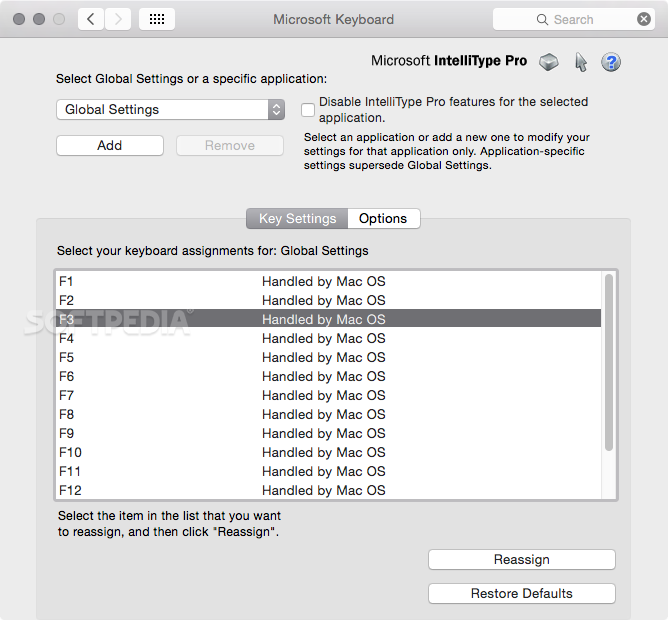
    By using the software, you can reassign mouse buttons and keyboard keys to open a program, file, or Web page.

    Some keyboard models provide a fingerprint scanner for advanced identity management. You can also use the software to control the wheel settings, and assign commands and application-specific functions to the mouse buttons and keyboard keys.

    Microsoft IntelliType Pro and IntelliPoint also help you customize the Microsoft keyboard and mouse in order to fit your needs.

    Here are some key features of "Microsoft IntelliType Pro":

    Magnifying:
    · You can now change the magnification level. Press and hold the Magnify button, and then roll the mouse wheel. Roll the wheel away from you to increase the magnification level, toward you to decrease the magnification level.

    Key Assignments:
    · When Microsoft Keyboard Preferences is the active window, pressing a key will reassign the key, instead of activating the current key assignment.

    Scrolling:
    · Horizontal and vertical scrolling may not work in some applications. Scrolling functionality is provided by the Mac OS X operating system. If the application that you are using follows the Mac OS X scrolling guidelines, you will be able to scroll in that application. Note: To scroll horizontally, you must also have a mouse with a tilt wheel or a keyboard with a wheel.

    Scrolling Speed:
    · When vertical scrolling is set to the highest scrolling speed, scrolling will function in the same way as the Page Down and Page Up commands.

    User Accounts:
    · New user accounts created after the software is installed may have extra features disabled. After logging on, the new user must open Microsoft Mouse Preferences or Microsoft Keyboard Preferences (and change settings, if desired) for the settings and extra features to work as expected.

    Exposé (Mac OS X v10.3):
    · When you use both Exposé and IntelliPoint software, the mouse button settings specified in IntelliPoint are used instead of the button settings specified in Exposé. To use the Exposé button settings, change the button assignment in IntelliPoint to Handled by Mac OS.

    Zooming:
    · Zooming may not be supported by applications that use custom controls.

    Modifier and Hot Keys:
    · If you press a modifier key (such as Shift, Control, or Alt) while pressing a Hot Key, the Hot Key may not function or may activate a different command.

    My Favorites Keys:
    · When you upgrade from an older version of IntelliType Pro, the My Favorites keys won’t work until you open Microsoft Keyboard Preferences at least once.

    Wired and Wireless Devices:
    · If you connect a wired and wireless device to your computer at the same time, the wireless device will appear in Microsoft Mouse Preferences or Microsoft Keyboard Preferences for configuration. This may restrict access to some of the additional keys or buttons that are on the connected wired device.

    Keyboard Layout:
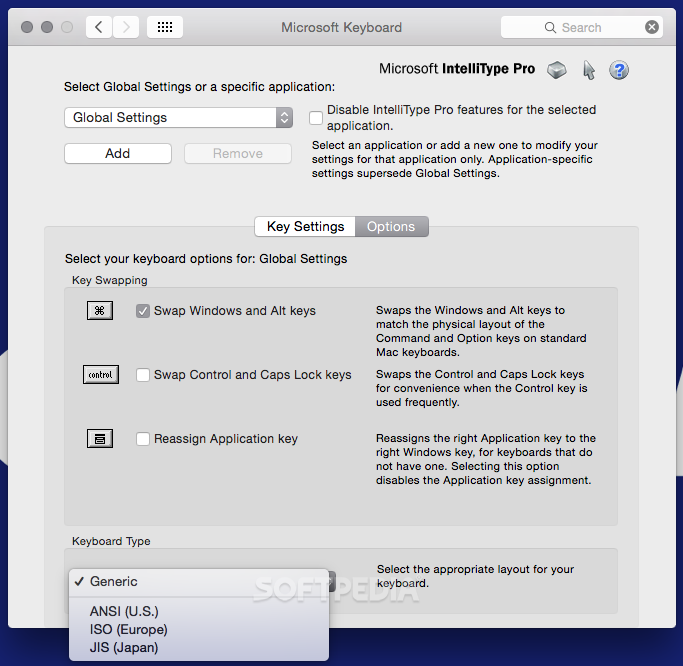
    · When you select a new keyboard layout in Microsoft Keyboard Preferences, some keys may not work as expected until you log out and then log on again.

    Japanese OS:
    · When you use the Natural Keyboard Pro or Internet Keyboard Pro on a Macintosh with the default language set to Japanese, some keys may not work as expected until you select the JIS keyboard layout, log out, and then log on again.

    Requirements:

    · Microsoft Wireless, Natural, Multimedia, or Office keyboard
    · Microsoft Mouse
    · 30 MB hard disk space
    · One USB port

    What's New in This Release: [ read full changelog ]

    · Mac OS X 10.6 support.

      Softpedia guarantees that Microsoft IntelliType Pro 7.01 is 100% CLEAN, which means it does not contain any form of malware, including spyware, viruses, trojans and backdoors. [read more >]


    TAGS:

    Microsoft IntelliType | mouse driver | keyboard driver | mouse | hardware | device


    HTML code for linking to this page:


    Go to top

    Windows tabGames tabDrivers tabMac tabLinux tabScripts tabMobile tabHandheld tabGadgets tabNews tab

    SUBMIT PROGRAM   |   ADVERTISE   |   GET HELP   |   SEND US FEEDBACK   |   RSS FEEDS   |   ENTER NEWS SITE   |   ENGLISH BOARD   |   ROMANIAN FORUM