Search Perform an advanced search query SOFTPEDIA
 
SOFTPEDIA
Updated one minute ago
HomeSubmit a program for being reviewedAdvertise on our websiteGet help on surfing our websitesSend us your feedbackGet information about our XML/RSS backend and how to use itBrowse the news archiveVisit our discussion forumVizitati forumul in limba romana


NormalFreeware onlyShareware only

EyeTV 3.0.2

Click to download EyeTV
Add to download basket
Send update information
View more screenshots
Rating: Good (3.2/5)
Rated by: 25 user(s)
Recent news
- Flipswap Can Trade Your B...
- PreFab Event Taps Testben...
- Leaked: iPhone to Sell at...
- Organized – Free Widget f...
- UK to Get a 'Limited...
- Marware Introduces Sportf...
- Ubisoft to Launch Its Gam...

 Downloads: 36,977
 Developer: Elgato Systems LLC | More programs by this producer
 License: Comercialware
 Price: 118 $ to buy 
 OS: Mac OS X 10.4 or later
 Binary format: Universal Binary
 Size: n/a MB
 Download time: 56K: <1 s  64K: <1 s  128K: <1 s  768K: <1 s
 Last Updated: May 8th, 2008 13:28
 Category: MAC HD :: Drivers
 Read reviews (0) Add a review Refer to friend Subscribe

EyeTV description Download
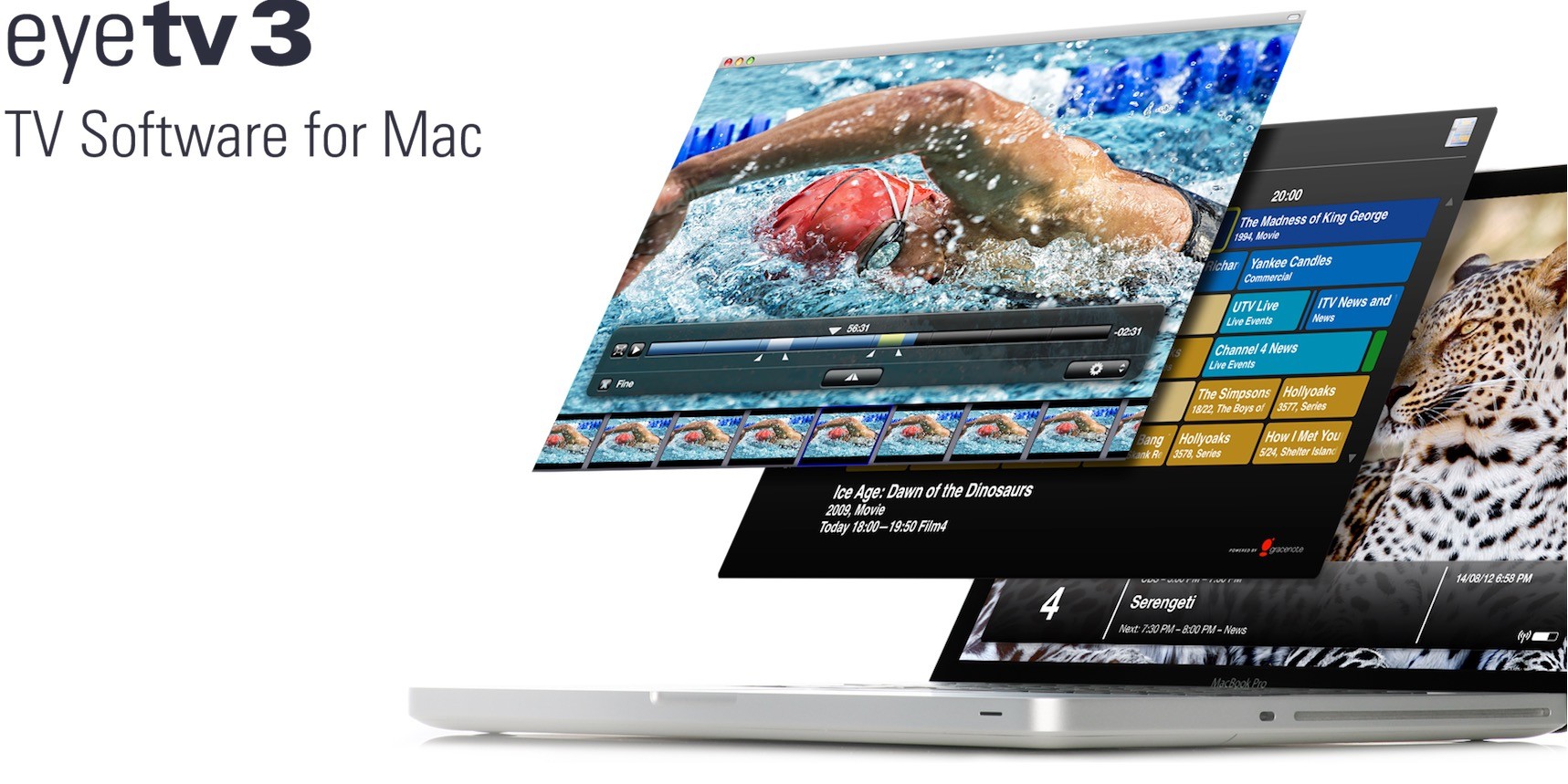
Eye TV Digital Video Recorder frees you from TV schedules. Find and track all the programming you want to see, and watch it whenever you want to. Pause live television.

Skip commercials. Record your favorite shows permanently using your CD burner. EyeTV will change the way you watch television.

Playlists are analogous to iPhoto Albums. You can arrange your recordings according to your own criteria in a playlist. There is no limit to the number of playlists you can create.

EyeTV allows you to Arrange your channels by genre, content or other criteria in favorite channel lists.

EyeTV has an integrated electronic program guide. The entire text of the guide is searchable.

Here are some key features of "EyeTV":

Watch

· Watch live TV on your Mac.
Turn your Mac into the coolest television in the house. Pause the TV show while you get a snack. Rewind and watch that great play again. Fast forward past the advertisements. Float the EyeTV window on top of other applications and keep an eye on your show while you work or surf the Web. Or, go “Full Screen”, stretch out on the couch, and channel surf with an EyeTV or Apple Remote.

· Integrated, searchable Program Guide (EPG)
EyeTV puts detailed and up-to-date TV listings at your fingertips, ready to view and search. Free TV listings are supplied by the DVB guide in Europe and Australia. EyeTV also comes with one year of free listings in Europe from tvtv.com (19.80 EUR value), and in Australia a 3 month + 3 month free trial from IceTV.com.au.

Record

· Record your favourite shows
Is the show you've been watching for the last 10 minutes a keeper? Save the first part of the programme that you’ve already watched along with the rest of the show. EyeTV can record from the live TV buffer and won’t mind a bit if you pause, rewind, and fast-forward through the rest of the show at the same time.

If you're the type who likes to plan ahead, simply cruise through the Program Guide and pick the shows you want to record up to two weeks in advance. You can even set up recordings over the internet while you’re away from home (tvtv/IceTV account required). Fans of radio programming, take note: EyeTV also enables you to record and edit DVB radio.

· Wi-Fi Access for iPhone and iPod touch
Why use up valuable disc space on that stunning iPod touch or iPhone? Why mess around with connector cables and synching? Take the easy route, and stream your EyeTV recordings straight from your Mac to your iPod touch or iPhone over a local Wi-Fi network.

· Organize channels
EyeTV provides detailed information about each television channel. Drag and drop the ones you watch most frequently into a “favourites” list, or go a step further and organize your sports, news, or movie channels into their own lists.

· Create playlists
Organize your growing library of EyeTV recordings any way you like. File them by series and season, by artist, by genre – there is no limit to the number of playlists you can create to store and find your recordings easily. And to make things easy, you can tell EyeTV to do your filing for you. Simply set up your recording schedules so they’re automatically added to the right playlist as soon as they finish recording. There’s more. Use Spotlight to search your recordings by name and description, whether or not the EyeTV application is open.

Edit

· Edit your recordings
Use EyeTV’s built-in Editor to remove unwanted content from your recording, or to crop the beginning and end of the show. The Editor also enables you to create one or more short clips from a longer recording and save the clips individually. If you’re in a hurry, simply export video clips straight to your iPod or Apple TV without saving them first.

· Build up your iTunes Library
Enjoy last night’s late show on your iPod or iPhone during your morning commute. Watch your own recordings on your widescreen television with an Apple TV. Build up your iTunes library with TV content that you’ve recorded yourself. EyeTV makes it all happen with one easy click of a button, or simply set your recording to export to iPod, iPhone or Apple TV automatically.

· Archive your collection
EyeTV integrates seamlessly with Roxio’s Toast® 8 Titanium (not included). To burn a DVD, simply select the recordings in EyeTV and click the Toast button – that’s all there is to it. You can also create a perfect back-up by dragging the recordings you’d like to backup from EyeTV directly into Toast’s data panel. Toast will span the data across multiple discs if necessary.

· Export to all important file formats
Care to work with your recordings in professional video editing software such as iMovie, iDVD, or DVD Studio Pro? EyeTV offers a large variety of intelligent presets which selects the optimum export format for you, or lets you chose the setting for yourself. EyeTV handles batch exports, and includes Sony PSP support.

Enjoy

· Superior Picture Quality
EyeTV is the only TV software that supports “Progressive Scan” for excellent picture quality, and it is capable of displaying full resolution HDTV on Macs with dual, G5, and Intel Core Duo processors. EyeTV also supports closed captions and DVB subtitles as well as Picture-in-Picture (PiP).

· Dolby Sound
EyeTV records and plays Dolby Digital sound, including 5.1 surround sound, where broadcast. EyeTV also supports the digital optical audio output built into newer Macs and passes Dolby 5.1 sound through to surround sound amplifier and speaker systems.


Requirements:

· Macintosh computer with a PowerPC G4 (500 MHz or faster), G5 or Intel Core processor
· 512 MB of physical RAM
· Built-in USB 2.0 ports & a compatible TV Tuner
· Internet connection is required to download Program Guide data
· A CD/DVD recorder and Toast 7 Titanium (or newer) software (not included) is required to create DVDs, SVCDs or Video CDs (optional)


What's New in This Release:

· Full Support for H.264 Broadcasts - EyeTV now fully supports digital television H.264 broadcasts in standard TV and HDTV resolutions. More and more countries are adopting the H.264 video compression standard for digital television. H.264 provides excellent picture quality at lower data rates than MPEG-2, thus reducing the amount of bandwidth required per channel. The end result is that television stations can broadcast more channels, while using the same number of transmitters.
· Several countries' over-the-air DVB-T broadcasts exclusively use the H.264 format: In Norway, both the free and Pay TV (RiksTV) services use H.264. Many other countries broadcast H.264 HDTV test transmissions in certain areas. H.264 broadcasts are also available in many digital cable systems and via satellite (DVB-S2). All EyeTV 310 digital satellite tuners shipped since November 2007 are capable of receiving DVB-S2. New Zealand's Freeview|HDTM service also uses H.264.
· Closed Captions Support in QuickTime Format Exports (North America only) - EyeTV now supports the exporting of ATSC/NTSC Closed Captions for use on iPhone, iPod, and Apple TV. The Closed Captions are also supported for playback in QuickTime and iTunes. When an ATSC/NTSC EyeTV recording with Closed Captions is exported from within EyeTV, EyeTV automatically creates a Closed Captions text track. The Closed Captions will be played back on the iPhone, iPod and Apple TV if Closed Captions have been enabled on the device. Turn on "Show Closed Captioning" in QuickTime Player, or the appropriate "Show Closed Captions When Available" preference on the iPod/iPhone/Apple TV or in iTunes. EyeTV will export the last Closed Caption track used in EyeTV. For example, if CC3 captions are used, they will be converted to CC1 captions upon export. Only one Closed Captions track is supported. It is recommended to have the latest software and firmware updates for QuickTime, iTunes, iPhone, iPod and Apple TV as older versions did not support Closed Captions.
· tvtv Sweden - Sweden has been added to the list of countries available for use with the tvtv electronic programming guide (EPG). When Sweden is selected as a country, the EPG will automatically be set to tvtv - UK.
· Separate Deinterlacing Options for Standard TV and HDTV - EyeTV now has separate deinterlacing options for Standard TV and HDTV. For Standard TV on Intel Core Duo Macs, the default is Progressive Scan. For HDTV, the default is Always. To change deinterlacing, open the Display pane in the EyeTV Preferences.
· The deinterlacing options can also be changed by using the On Screen Menu. This can be accessed by navigating to More>Settings>Display Options>Deinterlace in the On Screen Menu.
· Improved On Screen Menus - The text used in the On Screen Menus has been updated for improved readability. Errors and messaging have also been improved to help users troubleshoot problems. The On Screen Menu now has an Audio item that can be used to select a specific track on recordings with multiple audio tracks.
· Closed Captions (CC), HD, and Stereo Icons are now displayed in the Details screen of the On Screen Menu.
· Unplayed Recordings Badge - EyeTV now displays a badge over the thumbnail of recordings that have not yet been viewed.
· Hardware Support - Support has been added for the TerraTec Cinergy T USB XXS. Support has been added for the Digital Everywhere line of FireWire tuner products (FireDTV C/CI, T/CI, and S2). Please contact Digital Everywhere for a firmware update.
· EyeTV 310 firmware has been updated to work with the Netherlands Pay TV provider "Canal Digitaal".
· The overall stability and reliability of EyeTV has been improved.
· EyeTV 3.0.2 now automatically updates the built-in EyeConnect server. If you are using EyeTV 3's shared archive feature, this requires updating to EyeTV 3.0.2 on all computers.
· A problem that caused MPEG Program Stream exports to be corrupted has been resolved.
· A problem where Smart Guides would not update if two Smart Guides used the same criteria for "Any field" has been resolved.
· A problem which caused the Smart Guide searches to be 1 hour off has been resolved.
· A problem where edited MPEG-4 EyeTV recordings would not play back over markers has been resolved.
· Numerous improvements to resolve problems while running EyeTV from a non-admin user account.
· Problems which would cause the EPG to not be updated on a Standard User Account have been resolved.
· The RAM Cache in EyeTV is now limited to 1.5GB.
· The channel sorting for European channels has been improved.
· A problem that would cause the Turbo progress bar in EyeTV to use a large amount of CPU when exporting has been resolved.
· EyeTV now correctly auto-tunes both UHF and VHF channels in New Zealand.
· EyeTV now automatically starts and stops the EyeConnect server when the location of the EyeTV archive has changed.
· Resolved a problem with shared recordings not appearing.
· A problem which caused SECAM D/K analog signals to lose audio has been resolved.
· DVB subtitles no longer display over the editor and On Screen Menus.
· Improved parsing of the XMLTV data. Errors are now logged to the Console when XMLTV files can not be parsed. Successful parsing of the XMLTV data is also now logged to the Console.
· Several problems with EyeTV's auto update feature have been fixed so that downloads are now more reliable. ... [ read full changelog ]


Softpedia guarantees that EyeTV 3.0.2 is 100% CLEAN, which means it does not contain any form of malware, including but not limited to: spyware, viruses, trojans and backdoors.

This software product was tested thoroughly and was found absolutely clean, therefore it can be installed with no concern by any computer user.However, it should be noted that this product will be retested periodically and the award may be withdrawn, so you should check back on this page from time to time.

EyeTV Download EyeTV Screenshots
Find Related Downloads Buy EyeTV


RECOMMENDED PROGRAMS IN THIS CATEGORY ( Drivers )  

EyeTV 3.0.2
EyeTV - Watch, record, timeshift, edit & archive TV on your Mac
n/a MB | Mac OS X 10.4 or later | Comercialware
screenshot
update
The Missing Sync for Windows Mobile 4.0.3
The Missing Sync for Windows Mobile - For Pocket PC and Smartphone
38.41 MB | Mac OS X 10.4.8 or later | Comercialware
screenshot
update
IOXperts WebCam Driver 1.1.2 Beta 3 / 1.1
IOXperts WebCam Driver is a USB and FireWire webcam driver
3.95 MB | Mac OS 10.2.8 or later | Trial
screenshot
update
iPSP 3.0.3
iPSP - Use Sony Playstation Portable as multimedia player
15.66 MB | Mac OS X 10.4 or later | Demo
screenshot
update
USB Overdrive X 10.4.8
USB Overdrive X - USB driver handles most mice, trackballs, other input devices
408 KB | Mac OS X 10.2.8 or later | Shareware
screenshot
pick | update
SideTrack 1.6
SideTrack - Replacement driver for the Apple PowerBook and iBook trackpads
1.24 MB | Mac OS X 10.2 or later | Shareware
screenshot
update
SteerMouse 3.9
SteerMouse - Driver for Mighty Mouse, Tilt Wheel Mouse, Multi Button Mouse
820 KB | Mac OS X 10.4.3 or later | Trial
screenshot
update

MOST POPULAR PROGRAMS IN THIS CATEGORY ( Drivers )  

Drivers for the Motorola L6 1.0
Drivers for the Motorola L6 - iSync & Address Book (SMS) plugins
360 KB | Mac OS X 10.4 or later | Freeware
screenshot
update
Linksys Wireless-G Broadband Router WRT54GS 7.2.05 Build 002
Linksys Wireless-G Broadband Router WRT54GS - Router Firmware updater
1.59 MB | Mac OS X | Freeware
screenshot
update
EyeTV 3.0.2
EyeTV - Watch, record, timeshift, edit & archive TV on your Mac
n/a MB | Mac OS X 10.4 or later | Comercialware
screenshot
update
Zydas WLAN USB driver 4.5.70
Zydas WLAN USB driver - For usb wlan sticks based on ZD1211(b) chipset
2.5 MB | Mac OS X 10.3 or later | Freeware
screenshot
update
QuickCam Pro USB Driver 8.0.1
QuickCam Pro USB Driver allows you to use your QuickCam Pro on your USB Mac
1.9 MB | Mac OS X 10.1.5 to 10.2.6 | Freeware
screenshot
update
Apple NVIDIA Driver 3.0 1.1
Update for NVIDIA graphics cards.
2.2 MB | Power Mac G4 with built-in NVIDIA graphics card, Mac OS 9.2.2 or later. | Freeware
screenshot
new
The Missing Sync for Windows Mobile 4.0.3
The Missing Sync for Windows Mobile - For Pocket PC and Smartphone
38.41 MB | Mac OS X 10.4.8 or later | Comercialware
screenshot
update

go to top  


Welcome!
Hello, Guest

Login if you have a Softpedia.com account.

Otherwise, register for one.

Main categories:
  • Dashboard Widgets
  • Automator Actions & Workflows
  • Spotlight Plugins & Utilities
  • Antivirus
  • Audio
  • Business
  • Communications
  • Compression Tools
  • Developer Tools
  • Development
  • Drivers
  • DTP/Prepress
  • Educational
  • Finance
  • Font Tools
  • Games
  • Graphics
  • HTML Tools
  • Internet Utilities
  • iPod Tools
  • Math/Scientific
  • Multimedia
  • Network/Admin
  • Screensavers
  • Security
  • System Utilities
  • Utilities
  • Video
  • Desktop
  • Word Processing
  • iPhone Applications
  • Week's best:
  • Adobe Reader 9.0
  • GraphicConverter 6.1...
  • Mozilla Firefox 3.0 ...
  • Adium 1.3 Beta 6 / 1...
  • Vuze (formerly Azure...
  • Apple Mac OS X Updat...
  • Apple Security Updat...
  • G-Force Gold 3.8.3
  • Speed Download 5.0.4
  • Microsoft Messenger ...
  • OpenOffice.org 3.0 B...
  • SoundConverter 20080...
  • PlugINCool 1.1.1
  • LimeWire X 4.18.3
  • Mozilla Firefox 3.0 ...
  • Butler 4.1.6
  • NeoOffice 2.2.4 Patc...
  • RAR 3.80 Beta 2
  • Adium 1.3 Beta 6 / 1...
  • Opera 9.51 Build 488...
  • © 2001 - 2008 Softpedia. All rights reserved.
    Softpedia™ and Softpedia™ logo are registered trademarks of SoftNews NET SRL.
    Copyright Information | Privacy Policy | Terms of Use | Contact Softpedia | Update your software | Archive