MAC CATEGORIES:


NEWS ARCHIVE >>
SOFTPEDIA REVIEWS >>

7-DAY TOP DOWNLOAD

#
Program
iPhone and iPod
Firmware 3.1.2

17,548
Internet Explorer
5.2.3

7,948
RAR Expander 0.8.5
Beta 3 / 0.8.4

4,946
aMule 2.2.6
4,124
Flv Crunch 1.3
3,935
Toast Titanium
10.0.4

3,577
RAR for Mac OS X
3.90

3,532
Apple iLife '09
3,499
Matlab 7.9
3,431
aMSN 0.98.1
3,294

WEEK'S BEST

  • Quicksilver 1.0 Be...
  • Cocktail 4.6
  • Picasa 3.5.2.90
  • Adobe Shockwave Pl...
  • VLC Media Player 1...
  • LimeWire X 5.4.0 B...
  • Apple iTunes 9.0.2
  • VirtualBox 3.0.10 ...
  • FileZilla 3.3.0 RC...
  • Mozilla Firefox 3....
  • aMSN 0.98.1
  • NeoOffice 3.0.1
  • VMware Fusion 3.0....
  • Quinn 3.5.7
  • App Store Expense ...
  • Ableton Live 8.0.9
  • Parallels Desktop ...
  • Alarm Clock Pro 9.2
  • Dock Spaces 3.05
  • Dropbox 0.7.56 / 0...
  • OpenOffice.org 3.2...
  • Adium 1.4 Beta 15 ...
  • Second Life 1.23.5...
  • µTorrent 0.9.3 Bu...
  • Opera 10.10 Beta B...
  • Adobe Reader 9.2
  • VirtualBox 3.0.10 ...
  • RealPlayer 11.1.0 ...
  • Bean 2.4.1
  • Senuti 1.1.7
  • Home / Mac / Developer Tools
     Report spyware

    exe4j 4.2

    Download button

    Downloads: 1,283  Add to download basket  Tell us about an update
    User Rating:
    Rated by:
    Good (3.7/5)
    15 user(s)
    Developer:

    License / Price:

    Size / OS:

    Binary Format:

    Last Updated:

    Category:
    ej-technologies GmbH | More programs
    Demo / USD 69.00 | BUY the full version
    6.3 MB / Mac OS X 10.1 or later
    Universal Binary Universal Binary
    January 31st, 2009, 14:32 GMT [view history]
    C: \ Developer Tools

     Read user reviews (0)  Add a review  Refer to a friend  Subscribe


    exe4j description


    Java exe maker that helps you integrate your Java applications into the Windows operating environment

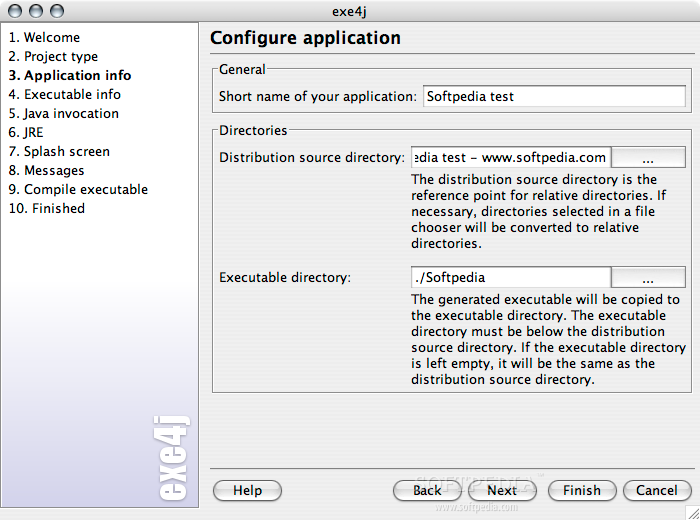
    exe4j is a Java exe maker that helps you integrate your Java applications into the Windows operating environment, whether they are service, GUI or command line applications.

    If you want your own process name instead of java.exe in the task manager and a user friendly task-bar grouping in Windows XP, exe4j does the job.

    exe4j helps you with starting your Java applications in a safe way, displaying native splash screens, distributing and detecting suitable JDKs and JREs, startup error handling and much more.

    Here are some key features of "exe4j":

    Customized JRE/JDK detection:
    · The executable can detect appropriate Java JREs and JDKs in the Windows registry, in environment variables, special directories and on the system path. You can fully customize the search sequence, error handling and supported JRE/JDK versions.

    Optional distribution of a bundled JRE:
    · exe4j allows you to distribute your own private JRE with your application. This way you can ensure that your application's requirements are definitely met. You can even configure where the JRE is located.

    Flexible classpath construction:
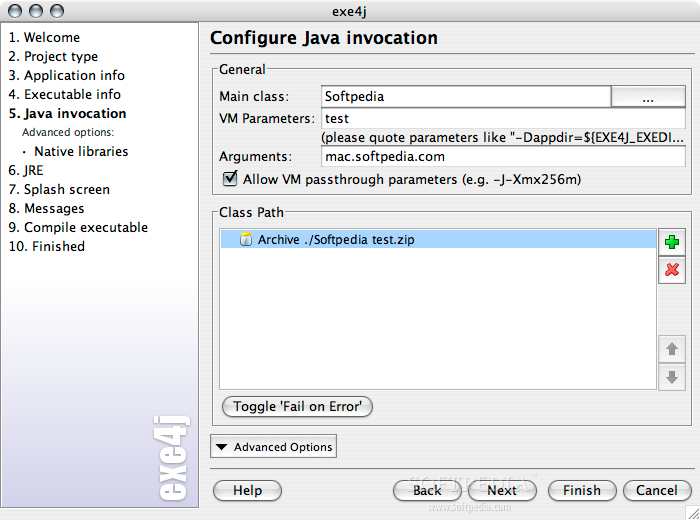
    · The classpath for your Java application can be fully customized to scan directories for JAR files, include specific directories and archives as well as insert environment variables. Customizable error handling allows you to interrupt the startup sequence with a specific error message instead of obscure NoClassDefFound exceptions later on.

    GUI or console applications:
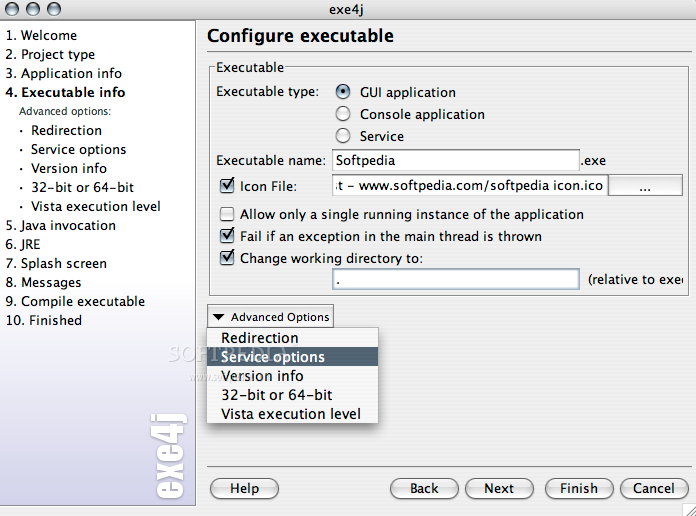
    · exe4j lets you compile GUI applications or console applications with an associated terminal window.

    Windows services:
    · exe4j enables you to easily create a Windows service with Java. With the command line switches /install, /uninstall, /start and /stop you have full control over your service.

    Optional inclusion of JAR files into the executable:
    · exe4j lets you include JAR files into the executable - in this way you can distribute your Java applications as a single EXE file.

    Custom process name instead of java/javaw:
    · exe4j launches your Java application in such a way, that the exe4j executable and not java.exe or javaw.exe will appear in the task manager. In Windows XP, the task bar grouping will display the name of your executable and the associated icon, instead of the non-descript terminal icon and the string "javaw".

    Custom icon for your executable:
    · exe4j lets you specify an icon file that will be compiled into your executable. This gives your application a much more professional appearance than a batch file or an executable JAR file would.

    Custom working directory:
    · If required you can adjust the working directory to a specific directory relative to the executable. This is especially helpful for console applications which can be invoked from arbitrary directories. This way, you don't need to define fragile environment variables like MYAPP_HOME.

    VM parameters file:
    · For every executable, you can create a user editable VM parameters file. If your executable is called hello.exe, the VM parameters file is called hello.exe.vmoptions and each line in it is added as a single VM parameter.

    Version info resource:
    · exe4j can generate a version info resource entry in your executable. This version info is displayed for example in the property dialog of the Windows explorer. If you wish to obtain the "Designed for Windows" logo, this is an important requirement.

    Native splash screen:
    · For GUI applications, a native splash screen gives the users of your application an optimum feedback about application startup within fractions of a second. Textual status information about application startup and version information can be freely placed on the splash screen. From within your Java code, this status information can be easily updated with one simple call. With exe4j's "auto-off" mode activated, the splash screen is hidden, as soon as your application displays a window.

    Redirection of stderr and stdout:
    · Output stream and error stream can be redirected to customized files. This gives you access to valuable information like an exception stack trace on stderr that would otherwise be lost for a Java GUI application.

    Startup failure detection:
    · No more flashing terminal windows and GUI applications that hang without displaying anything. exe4j executables can monitor a stderr output file and display a native dialog with helpful information to inform about startup failures.

    Optional single application instance enforcement and multiple startup notification:
    · If your application must only be started once, an exe4j generated launcher can enforce this condition. Existing application windows will be brought to the top if a user starts the application a second time. The exe4j API allows you to register a listener that reacts to multiple startups and receives the parameters of the command line.

    Fully localizable messages of the executable:
    · All messages of the executable are localizable. This way, the executable can blend into the target locale of your application.

    Requirements:

    · JDK/JRE 1.5 or later

    Limitations:

    · Evaluation warnings

    What's New in This Release: [ read full changelog ]

    New features:
    · Support for including other .vmoptions files with the new -include-options [path to .vmoptions file] VM parameter. This works in the fixed VM parameters as well as the .vmoptions files.
    · Added a "Save installer variables to the Java preference store" action that saves selected installer variables that can be encoded as strings
    · Added a "Load installer variables from the Java preference store" action
    · Launcher API: com.install4j.api.launcher.Variables offers methods to get compiler and installer variables in the launcher and to load and save installer variables from the Java preference store
    · Launcher API: com.install4j.api.launcher.Variables offers methods to access the installer and compiler variables of the installer
    · Added a "Load response file" action
    · Default installer template: Added a "Load response file" action to the "Installation directory" screen to load user input from a previous installation
    · Default uninstaller template: added a "Load response file" action to the startup sequence to load user input from the installer
    · The proxy settings of the default browser are now used on Windows for all downloads
    · "Check for update" and "Download file" actions: Added "Ask for proxy if necessary" property. If deselected and the download fails, no proxy dialog will be displayed.
    · Added installer parameters -Dinstall4j.clearProxyCache=true and -Dinstall4j.showProxyConfig=true to control the proxy cache
    · Server side authentication for downloads is now supported. A dialog for entering user name and password is displayed if the web server requires authentication.
    · Windows GUI launchers: Added an optionally recognized -console parameter that connects stderr, stdout an stdin to the console from which the launcher was invoked
    · Added the option -splash [title] for installer applications that brings up a small progress window if unattended mode is selected with the -q option
    · Added a -wait [timeout in seconds] command line option for installers. In unattended mode on Windows, the installer application will wait for all launchers and installer applications to shut down before starting the installation. If the timeout is reached, it will exit with an error message.
    · Added a filter field in registry dialogs for screens, actions and form components
    · Tool bars now show icons with text. This setting can be changed by right-clicking a tool bar.
    · Show missing files in the distribution tree and on the custom code tab in red
    · Mac OS X: The principal language is now written to the Info.plist file
    · Added a "Missing files at build time" option to "General Settings->Media File Options" that determines the action if a file or directory in the distribution tree is missing. The default setting is now "Print a warning and continue".
    · Added a "Scan directory" entry type on the Installer->Custom code tab
    · All signed JAR files can now be packed with the Pack200 compression (with a lower compression ratio due to a single segment being used)
    · If the "Safe back button" policy is set for a screen, a back button is also displayed if all actions in the previous screen are configured for multiple execution
    · Updater templates: Execute downloaded installers in unattended or console mode depending on how the updater was invoked.
    · Do not set native look and feel for installer applications if the -Dswing.defaultlaf VM parameter is set
    · Added an installer variable sys.preferredJre that is set afer the "Install Files" action has run and contains the path to the JRE that will be used by the installed launchers.
    · Added a compiler variable sys.applicationId that contains the application ID of the project
    · If possible, the language selection dialog of a multi-language installer is now displayed in the system lanugage rather than the principal language. There is a new option on the "Languages" tab to always use the principal language.
    · Redirection files of launchers: Absolute paths and environment variables are now supported
    · "Single radio button" form component: Added "Selection script" property to execute code when the user clicks the radio button
    · Added "Default execution mode" property for all installer applications to be able to configure console or unattended execution as the default mode.
    · Added "Fall back to console mode on Unix" property for all installer applications. This is selected by default and switches to console execution mode if no X server is available.
    · Added a "Replace installer variables in a text file" action. Compiler variables and i18n keys are also replaced by this action.
    · Added a "Fail if no replacement occurred" property to all actions that modify files
    · "Copy file" and "Move file" actions now also work with directories and have been renamed accordingly
    · "Run executable or batch file" action: Environment variables can now be set or modified
    · "Run executable or batch file" action: Added "Show windows console" and "Keep console window" properties for Windows in order to show a console window with the output or the executable and optionally keep the console window open
    · "Create program group" action: Added separate options to disable the creation of Unix symlinks and Unix menu entries
    · The "Create start menu entry" action now also works on Linux/Unix
    · "Modify an environment variable on Windows": The changes are now reverted on uninstallation, this behavior can be controlled with the new "Revert on uninstallation" and "Only if not modified" proerties.
    · API: com.install4j.api.context.WizardContext now has methods to set the text of the navigation buttons
    · API: added com.install4j.api.UpdateUpdateDescriptor.checkVersion(String version) to check if a version is compatible with the minimum and maximum versions of an update descriptor entry
    · API: Property customizers can now be built with the new classes com.install4j.api.beaninfo.PropertyConverter and com.install4j.api.beaninfo.PropertyCustomizers
    · API: Properties of type java.util.LinkedHashMap get a default editor in the IDE if they are registered with the Install4JPropertyDescriptor.CONTEXT_STRING_TO_STRING_MAP context

    Bugs fixed:
    · Help text in property pane on Screens & Actions tab was black on some Vista installations
    · Using a splash screen image in PNG format with an alpha channel lead to a compilation error
    · .vmoptions files on Unix: leading spaces on a line were not ignored
    · Actions could sometimes not be added to screens in the uninstaller
    · Mac OS X: Service were started as the orignal user if "Restart as root" was selected in the "Require admin user" action
    · The directory name for the uninstaller was sometimes not saved to the project file under some circumstances
    · The uninstaller used the "Custom image for title bar" property from the installer
    · Fixed "Run executable" action on Vista when path contains special characters
    · "Run executable" and "Execute launcher" actions: stderr and stdout were not consumed by default
    · Version comparison for com.install4j.api.updateUpdateDescriptor.getPossibleUpdateEntry() has been improved
    · "Show URL" and "Show file" actions did not always work on Finish screen on Linux / Unix
    · Line endings in .vmoptions files were not adjusted correctly for Windows media files
    · "Single radio button" form component: installer variables were not replaced in the "Radio button label" property
    · Proxy dialog was not big enough in some look and feels
    · Do not warn or fail during a build if a missing file or directory has been excluded for the media file
    · "Create program group" action on Unix: Do not create symlinks in the same directory as the destination file, thereby overwriting the destination file
    · Downloads failed if the wen server reported an unknown file size
    · "Modify an environment variable on Windows" action: If "prepend" or "append" were selected fpr the "Modification type" property, the variable separator ";" was not inserted if the environment variable already contained a value
    · "Create program group" action on Unix: Symlinks were also created for launchers for which menu integration has been disabled
    · Fixed performance regression in code editor on Windows if JRE 1.6.0_10+ is used
    · Improved error reporting in installation log for actions that modify files
    · The -c and -console parameters did not have any effect on Windows for installer applications other than the installer itself
    · "Delete a node or key in the Java preference store" action: If the key or node did not exist, the action did not fail
    · Added an installer variable "sys.responseFile" that contains the path of the response file if a respose file has been specified on the command line with the -varfile option.
    · Windows program group was always set to default value even if a reponse file was specified on the command line
    · "Installation directory chooser" form component: In console mode, the installation directory was not changed
    · "Installation type screen": The associated label was not selected if the radio button was selected
    · Multi-line string properties could sometimes not be reset to an empty value
    · Mac OS X. CMD+Q was not handled in the installer
    · Pack200 compression could produce archives with a Java 1.6 version number for some archives even if the minimum version of the project was set to 1.5
    · If there were multiple media output directories, the update descriptor updates.xml was only copied to the last one
    · Java editor: There were empty entries in the completion popup for constructor parameters
    · "Radio button group" form component: The initially selected index was not applied from a response file
    · Running the command line compiler with a relative path name for the config file did not correctly resolve resources
    · Java 5 syntax was underlined as an error in the editor on Mac OS X even if the Java minimum version for the project was set to 1.5 or higher

      Softpedia guarantees that exe4j 4.2 is 100% CLEAN, which means it does not contain any form of malware, including spyware, viruses, trojans and backdoors. [read more >]


    TAGS:

    build executable | executable compiler | executable builder | executable | compile | build


    HTML code for linking to this page:


    Go to top

    Windows tabGames tabDrivers tabMac tabLinux tabScripts tabMobile tabHandheld tabGadgets tabNews tab

    SUBMIT PROGRAM   |   ADVERTISE   |   GET HELP   |   SEND US FEEDBACK   |   RSS FEEDS   |   ENTER NEWS SITE   |   ENGLISH BOARD   |   ROMANIAN FORUM