
Grab screenshots of your entire desktop, windows, other widgets or specific areas of your screen, with this handy and easy-to-use Dashboard widget. #Take screengrabs #Desktop screenshots #Dashboard widget #Screenshot #Screengrab #Capture

Screenshot Plus is an unobtrusive widget for your Dashboard that allows you to capture screenshots, export them directly to other applications or save them on your hard drive in various formats.
Screenshot Plus is very easy to use, but it would benefit from some more advanced configuration options, as they are quite limited.
After installing it, Screenshot Plus can be found on your Mac’s Dashboard, which means that you can bring it up with a single key press whenever you want to perform a screen capture.
Its interface is minimalist even for a widget, taking up a very limited amount of screen space, so as not to clutter your Dashboard unnecessarily.
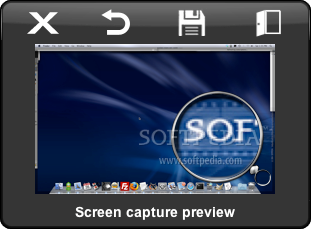
Given its simple design, Screenshot Plus is surprisingly versatile. Each of its buttons triggers a particular screen grab mode, depending on the location or type of content you need to record. You can define the capture area manually, select a certain window or even another widget.
It is also possible to set up a timer, in case you need to perform other actions to bring up the objects that you want to capture. However, the app does not allow you to modify the timer’s duration.
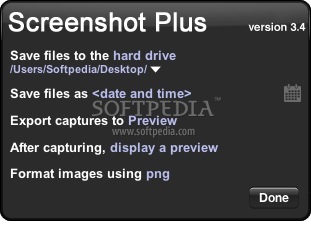
The Screenshot Plus utility provides a useful feature that enables you to open the captured images directly in other applications, doing away an additional, often unnecessary step. It should be noted though that Spotlight needs to be enabled for Screenshot Plus to be able to create a list of target apps.
If you choose to store the pictures on your hard drive, you can save them in multiple formats and insert the current date and time into their name, however, a more complex file naming scheme cannot be set up.
Screenshot Plus is a free and straightforward Dashboard widget for your Mac whose name sums up its functionality quite accurately. Screenshot Plus can help you capture screenshots of various objects, and then export them to other applications or save them on local storage.
Screenshot Plus Widget 3.4
add to watchlist add to download basket send us an update REPORT- runs on:
- Mac OS X 10.4 or later (PPC & Intel)
- file size:
- 152 KB
- filename:
- Screenshot_Plus_3.4.wdgt.zip
- main category:
- Dashboard Widgets
- developer:
- visit homepage
Context Menu Manager

Microsoft Teams

7-Zip

Windows Sandbox Launcher

calibre

ShareX

4k Video Downloader

Zoom Client

IrfanView

Bitdefender Antivirus Free

- Zoom Client
- IrfanView
- Bitdefender Antivirus Free
- Context Menu Manager
- Microsoft Teams
- 7-Zip
- Windows Sandbox Launcher
- calibre
- ShareX
- 4k Video Downloader