
Terminal based utility that makes it simple for its users to compress, uncompress and encrypt files archived using the RAR format. #File archiver #RAR archive #Compress file #Archiver #Unarchiver #Expander
If you recently switched from Windows to Mac, you probably what to know what is the equivalent of WinRAR on Mac. Fortunately, the developer of WinRAR offers a Mac version.
WinRAR is a command-line tool specially designed to help users compress, uncompress and encrypt files in the RAR format.
Unfortunately, WinRAR does not offer a user interface and all operations must be run from a Terminal window. In other words, it is not as simple to use on Mac as it was on Windows.
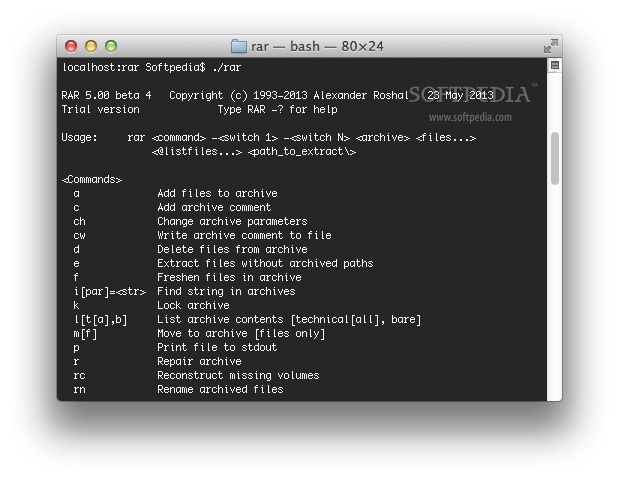
The package comes with a 40-day trial and features the rar and the unrar tools, rar for creating archives and unrar for extracting RAR files.
If you want to be able to run the RAR for macOS utilities from any folder on your Mac, you can copy them into usr/local/bin, the folder where all UNIX programs a normal user would use should be installed.
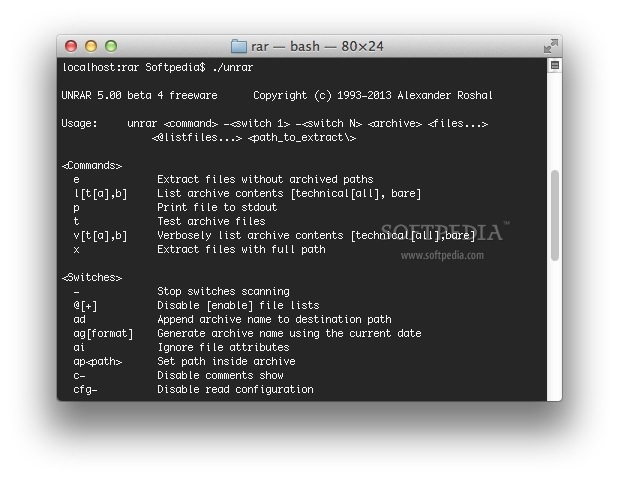
In order to extract a RAR archive, you have to open a Terminal window, go to the folder where you want to extract the files and type the unrar command line followed by the "x" argument and the path of the archive you want to use for extraction.
To list all available command and switches, you only have to run the rar or unrar command line utility from a Terminal window and a usage message will be displayed.
WinRAR provides a long list of features that enables you to create password-protected archives, batch extract RAR files and more.
Sadly, it comes with support exclusively for RAR files, ZIP and other formats being supported only by the Windows version.
All-in-all, WinRAR is a powerful and versatile utility that can help you extract and create RAR archives. Unfortunately, the lack of user interface pushes away newcomers and inexperienced users.
Download Hubs
WinRAR is part of these download collections: Open RAR
What's new in WinRAR 7.01 Beta:
- Bugs fixed:
- updating an encrypted file in a solid RAR archive produced a corrupt archive if updated file was the first in archive, no password was specified when starting updating and file name encryption in the updated archive wasn't enabled;
WinRAR 7.00 / 7.01 Beta
add to watchlist add to download basket send us an update REPORT- runs on:
- macOS (Universal Binary)
- file size:
- 655 KB
- filename:
- rarmacos-arm-700.tar.gz
- main category:
- Compression Tools
- developer:
- visit homepage
Context Menu Manager

Zoom Client

7-Zip

Windows Sandbox Launcher

Bitdefender Antivirus Free

calibre

ShareX

IrfanView

Microsoft Teams

4k Video Downloader

- IrfanView
- Microsoft Teams
- 4k Video Downloader
- Context Menu Manager
- Zoom Client
- 7-Zip
- Windows Sandbox Launcher
- Bitdefender Antivirus Free
- calibre
- ShareX