
A clean and useful archiving application that enables you to create, edit, preview, extract and protect your archives from within a user-friendly interface #Archive files #Edit archive #Expand archive #Archive #Extract #Expand
BetterZip is a fully-featured and user-friendly macOS application that provides the required tools to compress files and folders, edit existing archives, preview their content and password protect sensitive data.
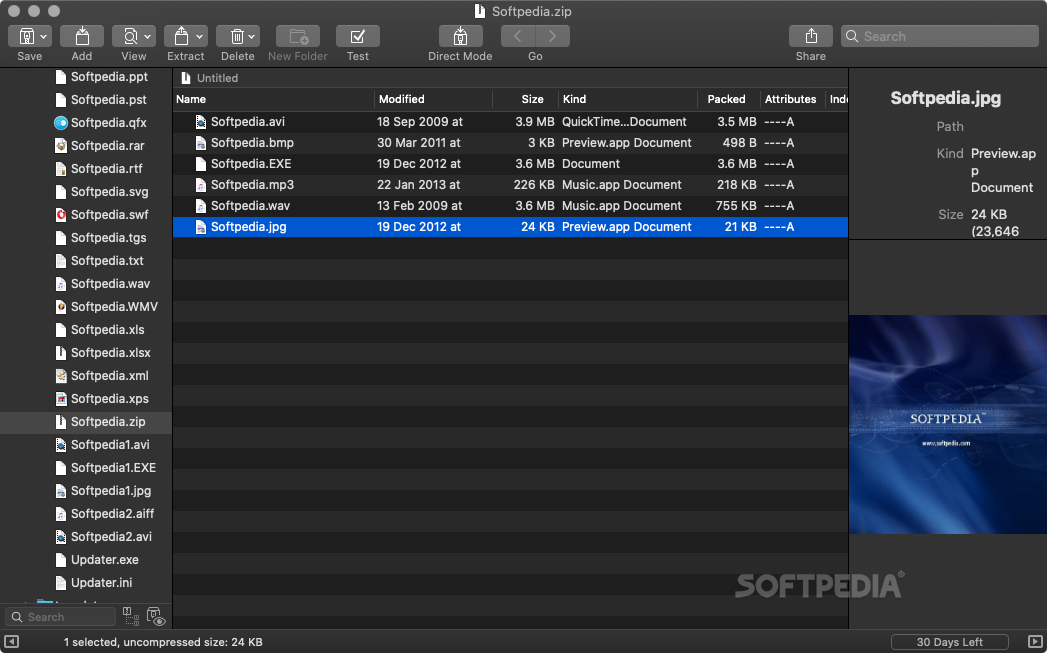
From BetterZip’s main window you can have quick and easy access to various tools that can help you save an archive, add files or folders to it, delete documents, preview files, extract data, clean and test archives with just a few clicks of a mouse button.
The left sidebar enables you to add your favorite folders into which you usually save your archives and explore their content. At the bottom of the sidebar you have a search form that can help you filter the displayed folders and files.
At the center of the main window is the file list panel that displays the content of the currently selected archive. By right-clicking on a file you can add it to your archive, extract all selected items, delete, preview or rename them.
Thanks to the right sidebar you can preview the selected file, check its path, kind, size and dimensions. If you need to filter the items displayed in the file list panel you can use the top right search form and type in the name of the file you need to find.
BetterZip’s features can also be accessed via the contextual menu and the practical queue list helps you perform multiple tasks in the desired order. The app supports macOS' QuickLook feature, a fact which enables you to preview your files without extracting them from the archive.
You can use BetterZip to compress multiple files into different archive formats. BetterZip allows you to set the desired compression level, choose the encryption method, split your archive into multiple volumes and remove Mac specific files from the archive.
What is more, BetterZip is capable to store a list of archive passwords in your keychain and automatically use them when you want to open an encrypted archive.
Download Hubs
BetterZip is part of these download collections: Make TAR, Open 7z, Create 7z, Create Tar
What's new in BetterZip 5.3.4:
- Bug Fixes
- Fixed Zstandard V 1.5.5 for Intel Macs.
BetterZip 5.3.4
add to watchlist add to download basket send us an update REPORT- runs on:
- macOS 10.13 or later (Universal Binary)
- file size:
- 23.1 MB
- filename:
- BetterZip.zip
- main category:
- Compression Tools
- developer:
- visit homepage
Microsoft Teams

calibre

Bitdefender Antivirus Free

4k Video Downloader

Context Menu Manager

7-Zip

ShareX

Windows Sandbox Launcher

IrfanView

Zoom Client

- Windows Sandbox Launcher
- IrfanView
- Zoom Client
- Microsoft Teams
- calibre
- Bitdefender Antivirus Free
- 4k Video Downloader
- Context Menu Manager
- 7-Zip
- ShareX