Softpedia
 

MAC CATEGORIES:


GLOBAL PAGES >>
NEWS ARCHIVE >>
SOFTPEDIA REVIEWS >>
MEET THE EDITORS >>
WEEK'S BEST
  • Apple TV Firmware 5.3 B...
  • Apple Configurator 1.3
  • Adobe Premiere Pro CC 7.0
  • Adobe After Effects CC ...
  • Java for Mac OS X 2013-...
  • Adobe InDesign CC 9.0
  • Adobe Illustrator CC 17.0
  • Adobe Photoshop CC 14.0
  • Dropbox 2.2.4 / 2.3.15 ...
  • Parallels Desktop 8.0.1...
  • Home > Mac > Business
     Report malware

    AuctionGenie 4.2.3

    Download button buy button

    Downloads: 1,473  Tell us about an update
    User Rating:
    Rated by:
    Good (3.3/5)
    14 user(s)
    Developer:

    License / Price:

    Size / OS:

    Binary Format:

    Last Updated:

    Category:
    Luxcentral Enterprises | More programs
    Trial / USD 50.00 buy button
    12.2 MB / Mac OS X 10.1 or later
    Universal Binary Universal Binary
    November 17th, 2012, 00:18 UTC [view history]
    Home / Business

     Read user reviews (0)  Refer to a friend  Subscribe

    AuctionGenie description

    Manages selling, bidding, tracking, and related activities for auctions listed on the eBay

    AuctionGenie is a Macintosh program that manages selling, bidding, tracking, and related activities for auctions listed on the eBay web site at ebay.com.

    You can use it to create and list your own auctions, automate bidding at specified times, track the status of auctions you're interested in (even those for which you have not yet placed bids), prepare transaction reports, send feedback, and manage post-auction transactions such as payment and delivery. It is the most advanced and automated software of its kind for the Macintosh.

    Almost all bidding and selling operations you can do directly on the eBay web site you can do with AuctionGenie, but you can do it faster and more efficiently and you can keep the auction information around as long as you like.

    For example, you can quickly process multiple requests with a single mouse click - submitting new auctions, sending bids, sending feedback or notifying winning bidders.

    At the core of AuctionGenie is a full-featured database that allows you to track auction activity offline. This database features all the characteristics you need to process your auction data -- sorting, searching, printing, and so on.

    Further, the auction data never disappears until you explicitly delete it, allowing you to keep historical information on hand that can be useful for generating financial reports or identifying market trends.

    Here are some key features of "AuctionGenie":

    Selling:
    Creating New Auctions:
    · You can completely define a group of new listings (standard listings or eBay Store inventory listings) to be submitted without logging on to eBay first. You do this by entering in the local selling database all the usual information eBay requires, but also some additional data that helps AuctionGenie generate more interesting listings — the layout style (four choices, although you can add any number of new layout styles you care to design) and the amount of the postage & handling fees, for example. Other handy features are the ability to specify the default values to be used whenever you create a new auction listing record and the automatic calculation of the eBay listing fee based on your listing options.

    Importing Auctions:
    · With a single click, you can import two weeks of auction listings you've previously submitted to eBay. This is useful the first time you use AuctionGenie to bring your local selling database up-to-date.

    Submitting New Auctions:
    · With a single click, all new auctions you've defined can be sent to the eBay web site. You can also automatically upload the picture files for the auctions to your FTP site.

    Relisting Closed Auctions:
    · With a single click, you can relist auctions that did not sell.

    Updating Bidding Statistics:
    · With a single click, you can update the bidding statistics for each item you're selling, including the amount of the high bid and the User ID of the high bidder. A bid increase is flagged with a red arrow.

    Creating and Sending Feedback on Buyers:
    · With a single click, AuctionGenie creates default feedback messages on successful bidders. With another click, you can send the feedback to the eBay system.

    Winning Bidder Notification:
    · With a single click, you can create notification messages for all winning bidders and place them in your email client's out box.

    Tracking Post-Sales Activity:
    · You can easily view all auctions that successfully sold, those that did not sell, and auctions that have not yet been paid for. You can also automatically create transaction status reports for buyers.


    Buying:
    Auction Tracking:
    · With a single click of the mouse, you can transfer the information in an eBay auction listing page being viewed in your browser to the local bidding database, allowing you to easily track the auction even if you may not yet be bidding on it. You can also import the 30 days of historical auction bidding information that eBay maintains for you — this is useful the first time you use AuctionGenie to bring your local bidding database up-to-date.

    Auction Bidding:
    · You can specify bids for multiple auctions in the bidding database, then process them all at once with a single click. You can bid not only on standard eBay auctions, but also on eBay Live and eBay Motors auctions.

    Updating Bidding Statistics:
    · With a single click, you can update the bidding statistics for each auction you're tracking, including the amount of the high bid and the User ID of the high bidder. A bid increase is flagged with a red arrow.

    Creating and Sending Feedback on Sellers:
    · With a single click, AuctionGenie creates default feedback messages on sellers for the closed auctions you've won. With another click, you can send the feedback to the eBay system.

    Tracking Winning Auctions:
    · You can easily view all auctions you've won, auctions you've paid for, and auction items you're still waiting to receive. You can also automatically create transaction status reports for sellers.


    Customizing:
    Template-Driven:
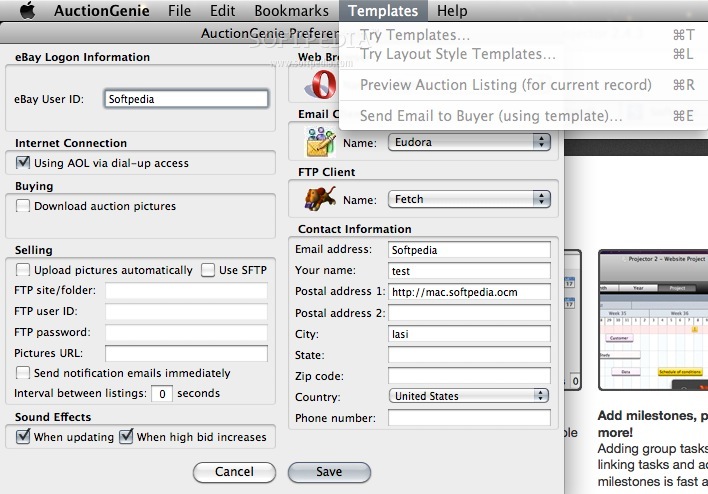
    · AuctionGenie uses templates to define the content of the standard text it creates for inclusion in the boilerplate section of auction listings, in winning-bidder notifications, in feedback messages, and in transaction status reports. It also uses templates to define the different layout styles that can be used when our item is displayed on eBay. You can provide your own templates for complete control over the text that AuctionGenie creates. Furthermore, you can include conditional statements in templates to allow different text to be created depending on the values stored in database fields.

    Requirements:

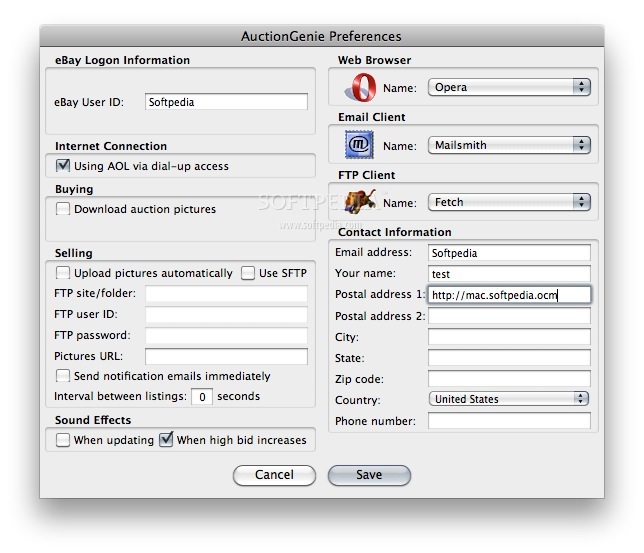
    · Web Browser - Apple Safari, Firefox, Netscape, America Online, OmniWeb, Opera, or Microsoft Internet Explorer.
    · Email Client - Apple Mail, Microsoft Entourage, America Online, Bare Bones Mailsmith, or Qualcomm Eudora.
    · FTP Client - Fetch, Interarchy, or Transmit. (Needed only if you're using AuctionGenie to post new auction listings and you want picture files to be uploaded automatically to your FTP site.)

    Limitations:

    · 30-day trial.
    · Nag screen.

    What's New in This Release: [ read full changelog ]

    · A duration of 30 days can now be selected for a fixed-price auction.

     Softpedia guarantees that AuctionGenie 4.2.3 is 100% CLEAN, which means it does not contain any form of malware, including spyware, viruses, trojans and backdoors. [read more >]


    TAGS:

    manage auction | manage sell | manage bidding | auction | sale | bid

    Go to top

    WindowsGamesDriversMacLinuxScriptsMobileHandheldNews

    SUBMIT PROGRAM   |   ADVERTISE   |   GET HELP   |   SEND US FEEDBACK   |   RSS FEEDS   |   UPDATE YOUR SOFTWARE   |   ROMANIAN FORUM