
Free OS X services to make creating Markdown-formatted text much easier. #Markdown format #Format text #Markdown service #Format #Markdown #Service
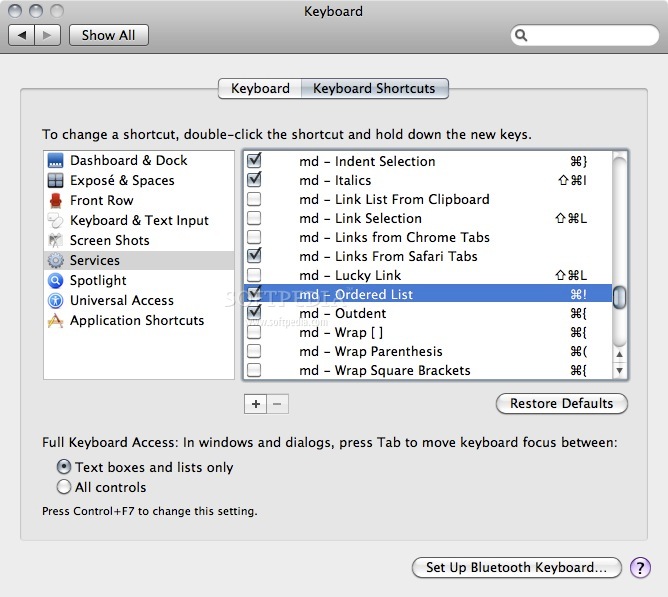
Markdown Service Tools is a free and very useful collection of OS X Services that will help users to create Markdown-formatted text a lot easier.
Services work in any Cocoa based application (which is most of the apps on your Mac). These Services were tested on Snow Leopard, but should work fine on Leopard... maybe even Tiger.
They're each prefixed with "md" to keep them together in your Services menu, and you can assign your own keyboard shortcuts (see last section of this document) to make accessing them convenient while typing.
The following Services are included: · md — Bold · md — Bullet List · md — Force Line Breaks · md — Indent Selection · md — Italics · md — Link List From Clipboard · md — Link Selection · md — Links From Chrome Tabs · md — Links from Safari Tabs · md — Luck Link · md — Ordered List · md — Outdent · md — Wrap Parenthesis · md — Wrap Square Brackets · md — Inline Links to References · md — HTML to Clipboard · MultiMarkdown to HTML
Installation: Simply drag the Services you want to use into `~/Library/Services` (where ~ represents your user's home folder). You will have to enable the Services manually in the Keyboard Shortcuts preference pane of System Preferences. Locate them in the list and check the box to the left. You may have to restart running applications to get them to show up. They will become available in the Application Menu->Services menu, as well as from the right/Control-click contextual menu, under the Services submenu (Snow Leopard).
NOTE: Some Services are only available when text is selected, and some only when *no* text is selected but a text field is focused.
What's new in Markdown Service Tools 2.12:
- Improved “Unwrap paragraphs” service
Markdown Service Tools 2.12
add to watchlist add to download basket send us an update REPORT- runs on:
- Mac OS X (-)
- file size:
- 1.7 MB
- filename:
- MarkdownServiceTools2.12.zip

- main category:
- Automator Actions & Workflows
- developer:
- visit homepage
Bitdefender Antivirus Free

IrfanView

ShareX

Zoom Client

4k Video Downloader

calibre

Windows Sandbox Launcher

7-Zip

Context Menu Manager

Microsoft Teams

- 7-Zip
- Context Menu Manager
- Microsoft Teams
- Bitdefender Antivirus Free
- IrfanView
- ShareX
- Zoom Client
- 4k Video Downloader
- calibre
- Windows Sandbox Launcher