Softpedia
 

MAC CATEGORIES:


GLOBAL PAGES >>
NEWS ARCHIVE >>
SOFTPEDIA REVIEWS >>
MEET THE EDITORS >>
WEEK'S BEST
  • Twitter 2.2.1
  • handyPrint 4.1.2
  • AppCleaner 2.2
  • Dropbox 2.0.16 / 2.1.16...
  • Reason 7.0.1 Build 3510
  • Apple iTunes 11.0.3
  • CrossOver Mac 12.2.1 Bu...
  • Skype 6.4.60.833
  • Mozilla Firefox 21.0 / ...
  • Skitch 2.5.2 Build 262792
  • Home > Mac > Audio
     Report malware

    MixTape 1.2.10

    Download button buy button

    Downloads: 1,161  Tell us about an update
    User Rating:
    Rated by:
    Good (3.0/5)
    2 user(s)
    Developer:

    License / Price:

    Size / OS:

    Binary Format:

    Last Updated:

    Category:
    Atomic Droplet | More programs
    Trial / USD 39.00 buy button
    3.6 MB / Mac OS X 10.4 or later
    Universal Binary Universal Binary
    April 14th, 2013, 07:22 UTC [view history]
    Home / Audio

     Read user reviews (0)  Refer to a friend  Subscribe

    MixTape description

    A software toy for music

    MixTape is a very easy to use application that allows you to quickly import the tracks you already know and love by a simple drag and drop from iTunes.

    Easy because beat matching is built in, accurate and works even with music that changes tempo. Easy to publish mixes onto the Internet or share between friends. Even easy to learn with screencast tutorials.

    Here are some key features of "MixTape":

    · Mixing tracks with automatic beat matching - Music is imported into MixTape by simply drag/dropping from iTunes. It then appears in the MixTape library with tabs showing where the individual beats are and these tabs can be used to either set the 'master' tempo for the mix, or to bring a tune in sync.
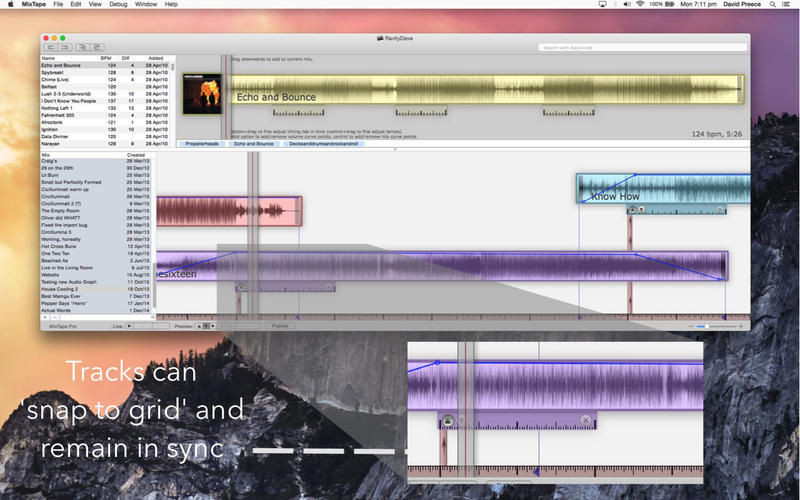
    · Once in sync the track can be dragged around the mix, or have it's in and out points set and everything will "snap to grid" aligning itself perfectly with the beat. The beat matching is far more accurate than manual beat matching meaning large overlaps and mashups several minutes long are both possible and simple.
    · Fader (volume) curves are set by just dragging control points to get the desired effect.
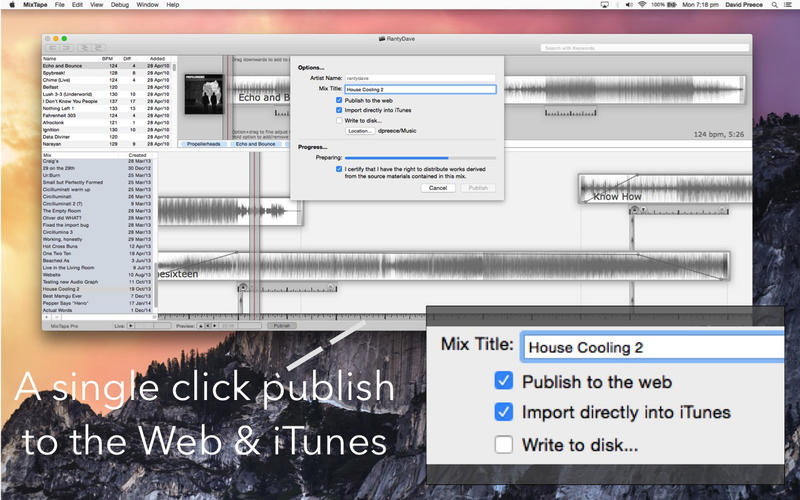
    · Sharing mixes with friends - When MixTape first starts you are prompted to create an account for an online service. We do this to make the process of publishing a mix onto the Internet as simple and smooth as possible.
    · Just click "Publish". Really. The whole process of encoding, tagging, allocating a space online and finally uploading is done for you. The result - a hosted mix online with track listing, on-page player, download link and facebook commenting created with no need for external accounts, encoders, taggers or HTML. Just like this one - and as simple as can be.
    · Of course we also include tools to remove, rename and find out which of your mixes is being downloaded the most.
    · Finally, you'll find that MixTape keeps all your tunes, timings and mixes as a single file (in your "Music" folder). This file can be freely copied to a USB thumb drive and used on a friend's machine. MixTape is quite happy having more than one library open at once and individual tunes or entire mixes can be copied from one library to another by just drag/dropping between them.
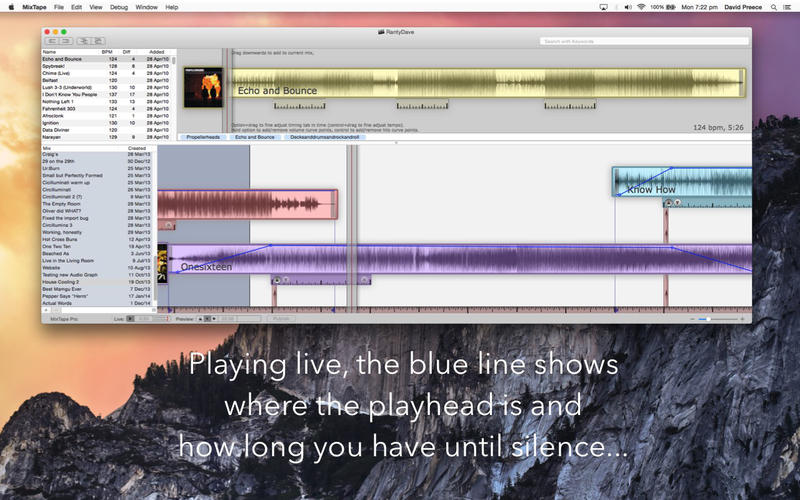
    · Pro version extras - First off, Pro users can have the UI be fully "live". The entire workspace is as a giant piece of magnetic tape and whatever passes under the playhead gets played - beats, envelopes, whatever. Pro also calculates (and displays) the spectral signature of your tunes - making it easy to visualise beats, phrases and the infamous "quiet bit" that needs just something to go with it.
    · Secondly is the ability to play a second stream live.
    · On the library side multi-threaded import gives a 70% speedup when importing on dual core machines .... more on quads and eights. And custom keywords mean you can tag your tunes by style, mood, tracks you've prepared for a particular event - whatever, really.
    · Finally since you're taking this a little more seriously, we include some serious hosting allowance - ten times the amount included with "Lite".

    Limitations:

    · 29 days trial period.

    What's New in This Release: [ read full changelog ]

    · Fine tuning of timing tabs can now be done 'live'. See support site for demonstration.
    · Can now add new timing tabs (select a track, press cmd+T, will place at playhead).
    · Published mixes now have chapter markers at the start of each track.
    · Dragging from the library to a finder window copies the file.
    · Pro users can both import and export uncompressed audio.
    · New midi sync offset (live) to correct for chain latency.
    · Rapid access to Atomic Droplet's social media presence (under the help menu).
    · Smoother scrolling.
    · Cleaned up UI around multiple (track) deletes.
    · Fixed 10.8 drag/drop import bug.
    · "Last Modified" dates now reworked as "Created".
    · A newly imported track is automatically selected in the library.
    · Fine tuning is now finer.
    · Fixed problems with 'web' MixTape being in a sandbox.
    · Fixed 'double import' problem.
    · Preview window shows track length and tempo.
    · Alerts can now be suppressed ("Don't show me this message again").
    · Live stream stops playing at end of mix.
    · Delete key works on tunes ...

     Softpedia guarantees that MixTape 1.2.10 is 100% CLEAN, which means it does not contain any form of malware, including spyware, viruses, trojans and backdoors. [read more >]


    TAGS:

    mix audio | import audio | edit audio | mix | audio | importer

    Go to top

    WindowsGamesDriversMacLinuxScriptsMobileHandheldNews

    SUBMIT PROGRAM   |   ADVERTISE   |   GET HELP   |   SEND US FEEDBACK   |   RSS FEEDS   |   UPDATE YOUR SOFTWARE   |   ROMANIAN FORUM