
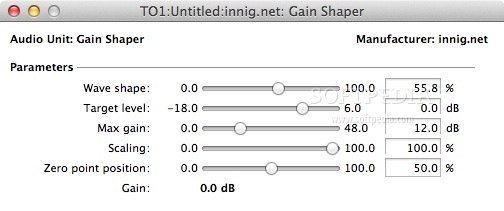
An free Audio Unit for OS X hosts for doing "manual compression" / gain enveloping in hosts that support AU parameter automation. #Audio shaper #Audio limiter #Audio compression #Shaper #Compress #Limiter
Compressors and limiters work on small time scales (milliseconds), and the distortion that comes with these micro-adjustments is not always desirable.
In some applications, it's better to "manually compress" a wave by drawing a gain envelope on a time scale of seconds (or even minutes!) instead of milliseconds.
This technique is especially useful in recordings with a wide dynamic range, like the piano music I record. It's nice to bring up the volume a bit in the quieter sections, so that the loudest peaks don't limit the overall volume of a piece.
Unfortunately, manually drawing volume curves can be quite tedious: there's a lot of trial and error involved in getting the levels right for each section so that nothing goes over the top and quiet sections are consistent with respect to one another.
Enter Gain Shaper. This audio plug-in will just adjust the volume of your audio — nothing more! — but does it in a way that will take advantage of the on-screen display of the wave.
You draw an automation curve that visually matches the shape of your wave, and Gain Shaper will adjust the volume for you based on the curve you draw.
System requirements
- AU host
What's new in Gain Shaper 1.0.1:
- It is now universal binary
Gain Shaper 1.0.1
add to watchlist add to download basket send us an update REPORT- runs on:
- Mac OS X 10.4 or later (PPC & Intel)
- file size:
- 180 KB
- filename:
- gain-shaper-1.0.1.zip
- main category:
- Audio
- developer:
- visit homepage
Bitdefender Antivirus Free

Windows Sandbox Launcher

7-Zip

Microsoft Teams

calibre

Zoom Client

ShareX

Context Menu Manager

4k Video Downloader

IrfanView

- Context Menu Manager
- 4k Video Downloader
- IrfanView
- Bitdefender Antivirus Free
- Windows Sandbox Launcher
- 7-Zip
- Microsoft Teams
- calibre
- Zoom Client
- ShareX
