Softpedia
 

MAC CATEGORIES:


GLOBAL PAGES >>
NEWS ARCHIVE >>
SOFTPEDIA REVIEWS >>
MEET THE EDITORS >>
WEEK'S BEST
  • Apple Configurator 1.3
  • Adobe Premiere Pro CC 7.0
  • Adobe After Effects CC ...
  • Java for Mac OS X 2013-...
  • Adobe InDesign CC 9.0
  • Adobe Illustrator CC 17.0
  • Adobe Photoshop CC 14.0
  • Dropbox 2.2.4 / 2.3.15 ...
  • Parallels Desktop 8.0.1...
  • TweetDeck 3.0.2
  • Home > Mac > Audio
     Report malware

    Blue Cat's Digital Peak Meter Pro 4.03

    Download button buy button

    Downloads: 1,396  View global page NEW!  Tell us about an update
    User Rating:
    Rated by:
    NOT RATED
    0 user(s)
    Developer:

    License / Price:

    Size / OS:

    Binary Format:

    Last Updated:

    Category:
    Blue Cat Audio | More programs
    Demo / EUR 98.00 buy button
    31.2 MB / Mac OS X 10.5 or later
    Intel only Intel only
    May 16th, 2013, 20:58 UTC [view history]
    Home / Audio

     Read user reviews (0)  Refer to a friend  Subscribe

    Blue Cat's Digital Peak Meter Pro description

    An easy to use unique audio analysis tool for your Mac

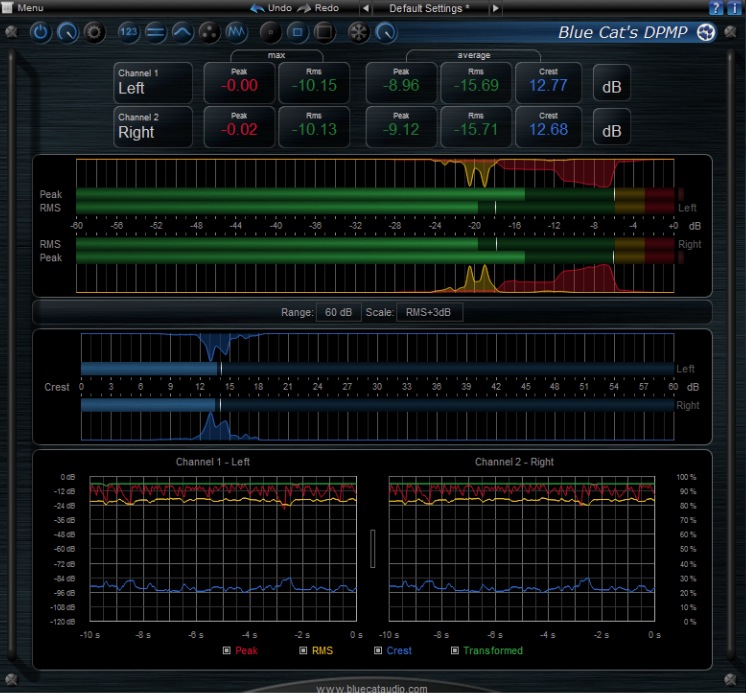
    Blue Cat's Digital Peak Meter Pro includes very customizable and flexible audio meters as well as advanced side chaining control capabilities thanks to its automation and MIDI output.

    The metering capabilities of the new DPMP let you control and monitor your audio signal exactly the way you want: almost every aspect of the meters can be customized.

    Blue Cat's Digital Peak Meter Pro now proposes five different scales, including Bob Katz's very popular K-System scales (K-12, K-14 and K-16). The graphs let you see the evolution of the audio envelopes over time, and the mid-side switch lets you verify mono compatibility problems and check the "stereoness" of your audio sources very easily.

    The peak and RMS envelopes can be combined together, reversed, modified and recorded as automation curves (see the screenshots) or sent as MIDI CC messages to control other effects in real time. The Peak Meter Pro Tutorials show you how to use these unique capabilities in your favorite host.

    Possibilities are endless, from voice over and ducking to side chain compression, multiples tracks monitoring or dynamic stereo enhancement. You can also control external MIDI hardware (such a synths, MIDI effects), video effects or lighting systems with your audio signal.

    Thanks to the ability to customize the MIDI output response curve for each parameter, no MIDI device will ever resist you!

    Here are some key features of "Blue Cat's Digital Peak Meter Pro":

    · Digital peak & RMS vu-meter.
    · Total control over the metering characteristics.
    · Bob Katz's K-System scales support (K-12 / K-14 / K-20)
    · Instant, average and maximum audio levels.
    · Stereo or mid-side analysis.
    · Control in real time any MIDI-compatible plug-in or external MIDI device with the RMS or peak envelope of the signal thanks to the plugin's MIDI CC output. See the Tutorials section for more examples.
    · Record the output parameters (peak, RMS value, transformed envelopes, clip etc.) as automation curves.
    · Manage the shape of the output envelope: record reversed envelope, change amount of signal, and offset the generated envelope. This lets you use the DPMP for side chain ducking, compression and much more.
    · Advanced signal monitoring with envelopes real time display.
    · Easy 'stereoness' and phase cancelation measurement.
    · Opacity control for the user interface.
    · Undo/Redo.
    · Import/Export presets and share them between the directX and VST versions.

    Blue Cat Audio Standards:
    · Native DSP code for optimal performance.
    · Skinnable user interface.
    · DirectX and VST plug-in formats support.
    · Smooth Update: silent (zipper-free) parameters update.
    · Full automation support (all parameters can be automated, with smooth and continuous update)
    · No CPU load on idle: when the plugin is fed with silence, the processing smoothly shuts down, to optimize the CPU usage of your Digital Audio Workstation.
    · Real time MIDI control with advanced settings (MIDI channel and CC numbers, with complete response curve control) and MIDI learn.
    · Any sample rate supported.

    Requirements:

    · VST / AU / RTAS / AAX host

    Limitations:

    · One single instance of the plug-in per session.
    · The plugin is regularly bypassed for a few seconds.

    What's New in This Release: [ read full changelog ]

    · Fixed AAX version not showing up in Pro Tools 10.3.5 on Windows.
    · Fixed user interface display issues when first opened in Ableton Live 9 (Mac).
    · Mac: Control MIDI settings dialog now brought back to front when already opened in the background.
    · Mac: fixed copy/paste keyboard shortcuts for plug-in registration that did not work in some hosts.


    TAGS:

    audio analysis | stereo enhancer | signal monitor | analyzer | enhancer | monitor

    Go to top

    WindowsGamesDriversMacLinuxScriptsMobileHandheldNews

    SUBMIT PROGRAM   |   ADVERTISE   |   GET HELP   |   SEND US FEEDBACK   |   RSS FEEDS   |   UPDATE YOUR SOFTWARE   |   ROMANIAN FORUM